Monday, April 9, 2012

Gmail's People Widget Shows Recent Photo Attachments

Gmail has never included an option to manage the attachments from the messages you've received. You can't see a list of PDFs received this month or a list of photos sent by one of your friends. Gmail's advanced search features let you find the messages that include PDF files or photos, but you have to open each message to see the files.

The people widget now shows more information about a contact: thumbnails of recent photos your contacts sent you. Clicking on a thumbnail opens the corresponding message.


For now, Gmail only shows the most recent 3 photos from a contact and doesn't let you see all of them. Maybe Gmail will integrate with the upcoming Google Drive and all the Gmail attachments will finally be searchable, easy to organize and share, just like Google Drive (Docs) files.

{ Thanks, Daniel. }

Google Music Labs

If you're looking for more features for Google Music, try the new Labs page. Google informs that "Google Play music labs are a testing ground for experimental features that aren't quite ready for primetime. They may change, break, or disappear at any time."

Right now, there are three experimental features available: desktop notifications for Chrome, HTML5 audio and 5-star ratings. If you enable 5-star ratings, thumbs ups and thumbs downs will be converted to 5 stars and 1 star. HTML5 audio "works in all browsers that support MP3 playback with HTML5 audio: Chrome, Safari 3.1+, and IE 9+" and replaces the hidden Flash player that's currently used.


After enabling desktop notifications, you should see an infobar that asks for permission. Click "allow" and Google Music will show a nice notification enhanced with a cover art thumbnail when a new song starts playing.


{ Thanks, Florian K. }

A Faster Emulator with Better Hardware Support

[This post is by Xavier Ducrohet and Reto Meier of the Android engineering team. — Tim Bray.]

The Android emulator is a key tool for Android developers in building and testing their apps. As the power and diversity of Android devices has grown quickly, it’s been hard for the emulator keep pace.

Today we’re thrilled to announce several significant improvements to the emulator, including a dramatic performance upgrade and support for a broader range of hardware features, notably sensors and multi-finger input.

Added GPU Support

The system image we’re shipping today has built-in GPU support (Android 4.0.3 r2). With Android’s growing reliance on using the GPU to improve performance, the difference is significant. In the video below, the emulator is still interpreting ARM instructions; the performance boost is the effect of putting the GPU to work.


As a bonus, since we’re now supporting OpenGL ES 2.0, your OpenGL games can now run inside the emulator.

Please note that there are a lot of GPUs out there, and we haven’t tested all of them for this beta release, so let us know if you have feedback or encounter issues.

More Hardware Feature Emulation

The hardware features of mobile devices are a significant part of what makes them a unique platform for development, so we’re also pleased to announce that in addition to the camera support we added last year, it’s now possible to use a tethered Android device to supply inputs for sensors and multi-touch input.

We’re working on providing emulator support for more hardware features including Bluetooth and NFC.

Improved CPU Performance

We’ve also improved the CPU performance of the Android emulator. Hardware floating point operation has been available for system images since Ice Cream Sandwich (Android 4.0), allowing CPU operations to be emulated roughly twice as quickly.

Last week’s r17 developer tools release included x86 system images and host drivers (available through the SDK Manager), allowing the emulator to access the host CPU natively and offer significantly faster execution.

This video shows a CPU-bound application on two emulators running the same system image, one with virtualization, one without.

Building a modern emulator

Because the Android platform allows deep interaction between applications, and with system components, we need to provide an emulator with a complete system image. Our emulator virtualizes a complete device: hardware, kernel, low-level system libraries, and app framework.

Of course, the system being emulated typically has an ARM CPU; historically, we’d been emulating those instructions in software, and that worked OK until the advent of tablet support with additional animations and complexity in Android 3.0.

The missing pieces were the completion of Android x86 support, and the GPU support in last week’s release of SDK Tools r17. This works by funneling the OpenGL ES 2.0 instructions from the emulator to the host OS, converted to standard OpenGL 2.0, and running natively on the host GPU.

Conclusion

The Android ecosystem has a lot of devices in many different form factors. Developers need a good way of testing these apps without having to own everything out there and a fast, rich Android emulator is immensely helpful.

We hope that these new improvements will make the emulator a more useful tool in your development and testing, and look forward to improving it further for you.

Wednesday, April 4, 2012

Google's Project Glass

After a few months of speculation, Google revealed some information about the project that will make Google Goggles and other mobile apps more useful. Instead of using a smartphone to find information about an object, translate a text, get directions, compare prices, you can use some smart glasses that augment the reality and help you understand more about that things around you.

"We think technology should work for you—to be there when you need it and get out of your way when you don't. A group of us from Google[x] started Project Glass to build this kind of technology, one that helps you explore and share your world, putting you back in the moment," says Google.


There's also a video that shows why the glasses could be helpful:


Google's concept glasses have a camera, a microphone and can connect to the Internet to send and receive data in real time. The interface is simple and it only shows relevant information.

One of the people who used the glasses said that "they let technology get out of your way. If I want to take a picture I don't have to reach into my pocket and take out my phone; I just press a button at the top of the glasses and that's it."

In February, New York Times reported that "the glasses [could] go on sale to the public by the end of the year. (...) The people familiar with the Google glasses said they would be Android-based, and will include a small screen that will sit a few inches from someone's eye. They will also have a 3G or 4G data connection and a number of sensors including motion and GPS." Seth Weintraub found that "the navigation system currently used is a head tilting-to scroll and click, (...) I/O on the glasses will also include voice input and output, and we are told the CPU/RAM/storage hardware is near the equivalent of a generation-old Android smartphone".

It will be interesting to see if Google will actually sell these smart glasses. There are a lot of issues that need to be solved before releasing a commercial product: from battery life to packaging so much technology in a such a small product, from improving Google Goggles to handling real-time video streaming.

Tuesday, April 3, 2012

The Gmail Public Labels API

[This post is by Nadav Aharony, a product manager on the Android team — Tim Bray]

We’re rolling out new developer features for the Gmail Android app: It now includes a public ContentProvider that you can use to retrieve label data. You can use this to access up-to-date unread counts for specific accounts’ inboxes and labels.

To use the API, the Gmail app needs to be at version 2.3.6 or higher on Froyo or Gingerbread; 4.0.5 or higher on Honeycomb and ICS. Before using it, be sure you first check the Gmail app version; we’ve provided a handy GmailContract.canReadLabels(Context) method to help with this. Your app will need the com.google.android.gm.permission.READ_CONTENT_PROVIDER permission.

Finding the Gmail accounts set up on the device

The Labels API needs a valid Gmail account to build a query for per-label information. Assuming the GET_ACCOUNTS permission, the AccountManager can be used to fetch this information:

// Get the account list, and pick the first one
final String ACCOUNT_TYPE_GOOGLE = "com.google";
final String[] FEATURES_MAIL = {
"service_mail"
};
AccountManager.get(this).getAccountsByTypeAndFeatures(ACCOUNT_TYPE_GOOGLE, FEATURES_MAIL,
new AccountManagerCallback() {
@Override
public void run(AccountManagerFuture future) {
Account[] accounts = null;
try {
accounts = future.getResult();
if (accounts != null && accounts.length > 0) {
String selectedAccount = accounts[0].name;
queryLabels(selectedAccount);
}

} catch (OperationCanceledException oce) {
// TODO: handle exception
} catch (IOException ioe) {
// TODO: handle exception
} catch (AuthenticatorException ae) {
// TODO: handle exception
}
}
}, null /* handler */);

Getting and accessing existing labels

Once you’ve got the email account, you can get a ContentProvider URI to query against. We've provided a simple support class called GmailContract.java for constructing the URI and defining the columns and relevant constants.

You can access any label, predefined or user-defined. The predefined labels include (you have to use symbolic constants rather than these strings, see below):

  • Priority Inbox

  • Starred

  • Chats

  • Sent

  • Drafts

  • All mail

  • Spam

  • Trash

To obtain a Cursor with information for all labels in an account, your app can either query this URI directly or use a CursorLoader. Here’s an example:

Cursor c = 
getContentResolver().query(GmailContract.Labels.getLabelsUri(selectedAccount),
null, null, null, null);

You can query and watch for changes on a single label by storing the URI value in the GmailContract.Labels.URI column from the cursor data.

The NAME value for pre-defined labels can vary by locale, so don’t use GmailContract.Labels.NAME. Instead, identify pre-defined labels like Inbox, Sent or Drafts using the String value in the GmailContract.Labels.CANONICAL_NAME column. Here’s an example:

// loop through the cursor and find the Inbox
if (c != null) {
final String inboxCanonicalName = GmailContract.Labels.LabelCanonicalName.CANONICAL_NAME_INBOX;
final int canonicalNameIndex = c.getColumnIndexOrThrow(GmailContract.Labels.CANONICAL_NAME);
while (c.moveToNext()) {
if (inboxCanonicalName.equals(c.getString(canonicalNameIndex))) {
// this row corresponds to the Inbox
}
}
}

If you choose to use a CursorLoader, it will keep the label counts up to date as they change over time.

Sample App

You can find a sample app that makes use of the new API here. The app provides a basic readout of label and message-count information.

People care about their incoming mail; we’re looking forward to seeing what you do with access to this information. We’re also open to suggestions as to how to improve and extend this new API.

Gmail's YouTube Lightbox

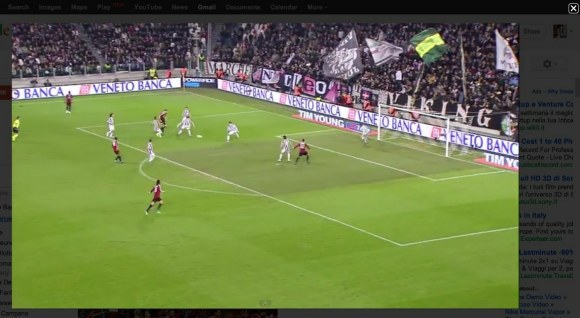
When an email message includes includes links to YouTube videos, Gmail shows a gadget that lets you watch the videos inside Gmail. The YouTube preview feature graduated from Gmail Labs two years ago.

Gmail now tests another interface for previewing YouTube videos, but it only works for YouTube's email digests. When you click one of the thumbnails from the newsletter, Gmail shows the YouTube player in a "lightbox". For some reason, this only works when the "Apps Search" lab feature is enabled.


{ Thanks, Emanuele. }

It's Easier to Organize Files in Google Docs

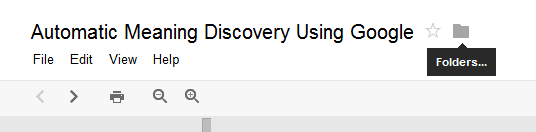
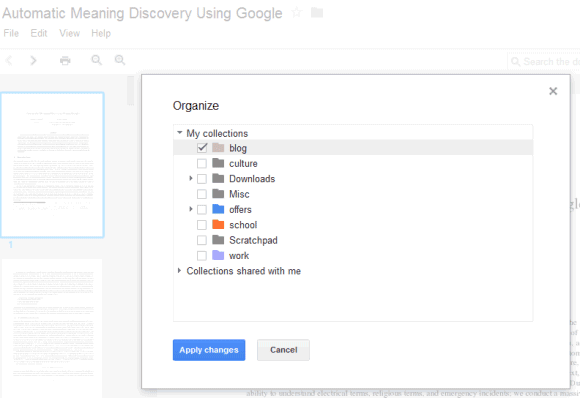
Google Docs now lets you move a file to a folder without using the Docs list. Just click the "folder" icon next to the title of the file and you can pick one or more folders. This works for documents, spreadsheets, presentations, drawings, PDF files and any other files.


Google uses the word "collection" instead of "folder" and that's confusing for both Google Docs users and Google's engineers. When you mouse over the new icon, the tooltip reads "folders". Google Docs collections are actually hierarchical labels because you can place a file in multiple collections.

{ Thanks, Cougar. }