Thursday, October 18, 2012

Google Play Seller Support in India

Posted by Ibrahim Elbouchikhi, Product Manager on the Google Play team


Over the past year, Android device activations in India have jumped more than 400%, bringing millions of new users to Google Play and driving huge increases in app downloads. In the last six months, Android users in India downloaded more apps than in the previous three years combined, and India has rocketed to become the fourth-largest market worldwide for app downloads. To help developers capitalize on this tremendous growth, we are launching Google Play seller support in India.


Starting today, developers in India can sell paid applications, in-app products, and subscriptions in Google Play, with monthly payouts to their local bank accounts. They can take advantage of all of the tools offered by Google Play to monetize their products in the best way for their businesses, and they can target their products to the paid ecosystem of hundreds of millions of users in India and across the world.
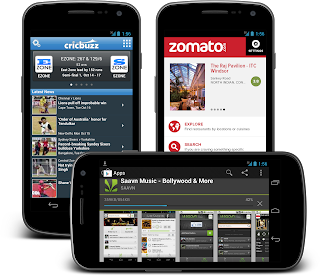


If you are an Android developer based in India, you can get started right away by signing in to your Developer Console and setting up a Google Checkout merchant account. If your apps are already published as free, you can monetize them by adding in-app products or subscriptions. For new apps, you can publish the apps as paid, in addition to selling in-app products or subscriptions.


When you’ve prepared your apps and in-app products, you can price them in any available currencies, publish, and then receive payouts and financial data in your local currency. Visit the developer help center for complete details.


Along with seller support, we're also adding buyer’s currency support for India. We encourage developers everywhere to visit your Developer Console as soon as possible to set prices for your products in Indian Rupees and other new currencies (such as Russian Rubles).


Stay tuned for more announcements as we continue to roll out Google Play seller support to many more countries around the world.


Wednesday, October 17, 2012

Bringing Google Calendar to the Play Store


Previously available only on select Android devices like Nexus S and Galaxy Nexus, you can now download the official Google Calendar app for Android from Google Play. Google Calendar makes it easy for you to manage all your calendars in one place, including those from your Google accounts and other calendars synced to your Android device. Beyond supporting the basics such as creating, editing, deleting events and responding to invitations, the new Google Calendar app has extra features that help you manage your time and communication more easily:
  • Snooze events directly from a notification if you’re not quite ready and want to be reminded later.
  • Use predefined messages to send quick "I'll be late" updates to your event participants directly from the notifications or the event itself (of course, you can always write your own).
  • Pinch to zoom in and out of a day.
  • Set a home time zone to help you manage your time better when traveling.
In addition, we also expanded the sync period so you can review past events from up to one year ago directly on your device. Download Google Calendar on Google Play today for devices running Ice Cream Sandwich (4.0.3+) or Jellybean. Use the Google Feedback feature in the app to let us know how we can make Calendar work better for you!


(Cross-posted on the Official Gmail Blog)

Monday, October 15, 2012

New Google Play Developer Console Available to Everyone

Posted by Eva-Lotta Lamm, Riccardo Govoni, and Ellie Powers of the Google Play team


We've been working on a new Google Play Developer Console, centered around how you make and publish apps, to create a foundation for the exciting features we have planned for the future. Earlier this year at Google I/O, we demoed the new version (video). Since then, we've been testing it out with tens of thousands of developers, reviewing their feedback and making adjustments.


Today, we’re very happy to announce that all developers can now try the new Google Play Developer Console. At its core, the Developer Console is how you put your app in front of hundreds of millions of Android users around the world, and track how your app is doing. We hope that with a streamlined publishing flow, new language options, and new user ratings statistics, you’ll have better tools for delivering great Android apps that delight users.


Sleeker, faster, easier to navigate


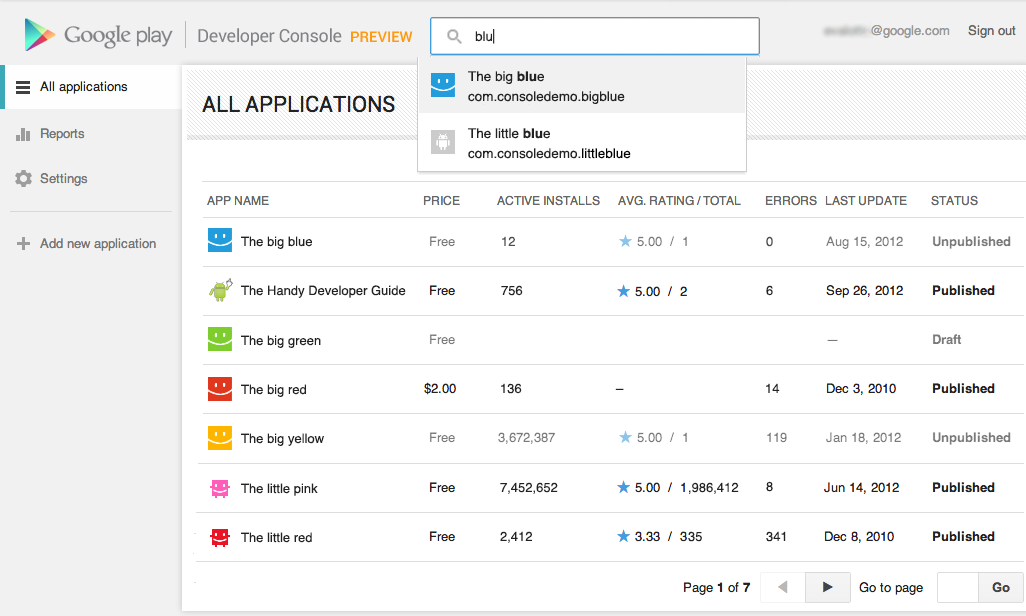
You spend a lot of time in the Developer Console, so we overhauled the interface for you. It's bright and appealing to look at, easy to find your way around using navigation and search, and it loads quickly even if you have a lot of apps.


Designed for speed. Quickly locate the app data and business information you use every day. More screenshots »


Track user ratings over time, and find ways to improve


One of the most important things you'll be able to do is track the success of your app over time — it's how you continue to iterate and make beautiful, successful apps. You'll see new statistics about your user ratings: a graph showing changes over time, for both the all-time average user rating and new user ratings that come in on a certain day. As with other statistics, you'll be able to break down the data by device, country, language, carrier, Android version, and app version. For example, after optimizing your app for tablets, you could track your ratings on popular tablets.


New charts for user ratings. You can now track user ratings over time and across countries. More screenshots »


Better publishing workflow


We've completely revamped and streamlined the app publishing process to give you more time to build great apps. You can start with either an APK or an app name, and you can save before you have all of the information. You can also now see differences between the new and old versions of an app, making it easy to catch unintentional changes before you publish a new version to your users.


More languages for listings, with automated translations


You'll also enjoy a new app publishing flow and the ability to publish your app listing in 49 languages. Once you've saved any change to your application in the new Developer Console, your users will have the option of viewing an automatic translation of your listing on the web today and soon on devices — no additional action on your part is needed.


How can you try the new version?


Go to your Developer Console and click on “Try the new version” in the header or go directly to the new version. If you prefer the new version, don't forget to bookmark the new URL.


Please note that we're not quite done yet, so the following advanced features are not yet supported in the new Google Play Developer Console: multiple APK support, APK Expansion Files and announcements. To use these features, you can click “Switch back” in the header at any time to return to the old version.


Click the “Feedback” link in the header to let us know what you think, so that we can continue to improve your experience as a Google Play developer. Thank you for all of the feedback so far.


Saturday, October 13, 2012

Chrome Frame, Bundled With Google Toolbar

If you install Google Toolbar for Internet Explorer, you may notice that Google installs an additional software: Chrome Frame. It's a plug-in that renders some pages using Chrome even if you use Internet Explorer. Web developers can add a meta tag that enables Chrome rendering if Chrome Frame is installed and that's especially useful if a page uses technologies that aren't supported by Internet Explorer (for example, HTML5 video in IE6, canvas in IE7, SVG in IE8).

"Google Chrome Frame seamlessly enhances your browsing experience in Internet Explorer. It displays Google Chrome Frame enabled sites using Google Chrome's rendering technology, giving you access to the latest HTML5 features as well as Google Chrome's performance and security features without in any way interrupting your usual browser usage," explains Google.


There are many Google services that use Chrome Frame: Google Calendar, Google Drive/Docs, YouTube and more. Now that Google Apps dropped support for old IE versions (IE6 - 2010, IE7 - 2011, IE8 - November 2012), Chrome Frame is the only way to use Google Apps if you can't update to a new IE release or switch to a different browser.

To see if Chrome Frame is installed, you can go to a site like YouTube or Google Calendar, right-click and see if there's a menu item called "About Chrome Frame". Another option is to type gcf:about:version in the address bar and see if a similar page is displayed.


To uninstall Chrome Frame, "use the standard Add or Remove Programs tool in the Windows Control Panel (called Programs and Features in Windows Vista and Windows 7)". It's not clear if Chrome Frame is only installed for new Google Toolbar or if the future updates will also include Chrome Frame.

Friday, October 12, 2012

New Interface for Google Mobile Search

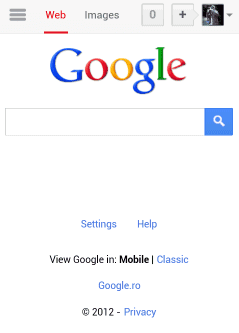
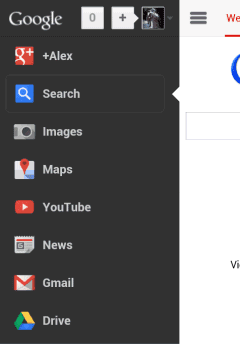
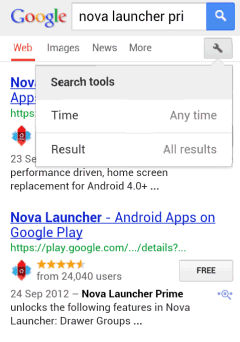
Google's mobile homepage and search results pages have a new interface. The homepage only links to Google Image Search and you have to tap a button to find all the other Google services. The idea is reminiscent of the "hidden" navigation menu launched last year and quickly replaced by the black bar.

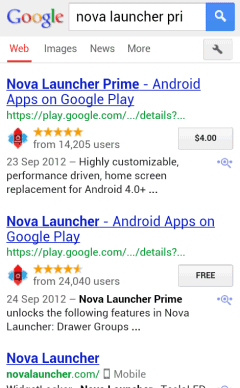
Search results pages don't include the menu, so you can no longer open Gmail from a search page and you have to go back to the Google homepage first. The search box has been shrinked, there's a bigger Google logo and the links to specialized search engines are displayed below the search box, just like in the tablet interface.


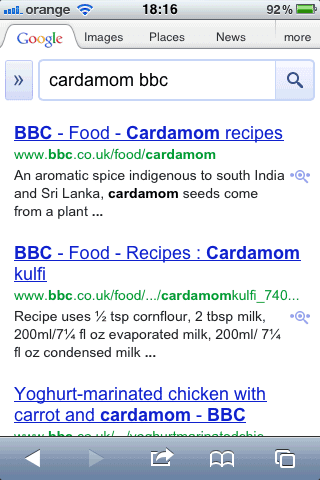
Here's a screenshot of the old interface:

Wednesday, October 10, 2012

More Funny Directions in Google Maps

Google Maps no longer recommends to swim across the Atlantic Ocean if you want to go from the United States to Europe. Google found a better way: "sail across the Pacific Ocean".


Google's directions from New York to Paris are quite straightforward: go to Seattle, then swim across Pacific to Hawaii, swim again to Asia where you are directed to drive through Asia and Europe to reach France. After only 519 hours you're supposed to reach the destination.

{ Thanks, Anon. }

Too Many Google Results From a Single Site

I don't know about you, but there's a feature that ruined many of my Google search results pages. It's not that Google can't return relevant results, the problem is that Google tries to be clever and detects keywords that are associated with a site. If it finds one, Google will return a lot of results from that site. In fact, sometimes you'll have a hard time finding results from other domains.

Ever since its launch, Google promoted diversity and used host crowding to show "up to two results from each hostname/subdomain of a domain name". Sometimes Google displayed a link that restricted the results to that domain or subdomain, but users had to click it. Matt Cutts wrote in 2007 that "we did hear complaints that for some types of searches (e.g. esoteric or long-tail searches), Google could return a search page with lots of results all from one domain. In the last few weeks we changed our algorithms to make that less likely to happen".

Then Google introduced sitelinks and started to show more pages from a domain. Two years ago, a Google blog post announced that "for queries that indicate a strong user interest in a particular domain, like [exhibitions at amnh], we'll now show more results from the relevant site". Since that announcement, host crowding was a thing of the past and Google started to include more and more results from a single domain.

I complained about this back in 2010 and mentioned that this feature could become annoying, but now it's much worse. Sometimes you can find queries that return mostly results from a domain. For example, when you search for [apple itunes] Google assumes that you want results from apple.com and starts to return a lot of irellevant pages. Sure, you can still find results from other domains, but 31 of the top 50 results are from apple.com.


If you search for [yahoo mail], Google returns a lot of uninteresting results from Yahoo's international sites, instead of including news articles, blog posts, reviews, tutorials.


Search for [berkeley college] and 26 of the top 50 results are from berkeley.edu. That's just too much. Having to constantly add to the query "-site:dominantresult.com" is annoying, not to mention that most Google users don't even know about search operators and shouldn't have to use them.

And this annoyance is not limited to navigational queries. What if you're not in India, search for [sony led] and Google's top 7 results are from Sony India? That's what happened when I disabled Google Instant and set Google to show 50 results per page.


Showing too many results from a domain is a bad idea because a search engine should offer information from multiple sources, while results should be relevant and comprehensive. Google's mission is to "organize the world's information and make it universally accessible and useful," but Google forgot to make the information accessible.

QueryDomainNumber of results in top 50
imdb ratingsimdb.com49
imdb ratings are brokenimdb.com46
google playgoogle.com31
playstationplaystation.com28
wordpresswordpress.org28
samsung led displaysamsung.com27