Google tests a new card-style interface for mobile search results. There are special cards for Knowledge Graph results, results from specialized search engines and for related searches. The new interface only shows Previous/Next buttons.
Many Google web apps and mobile apps use the card-style interface that was first added to Google Now. You can find it in Google Search, Google Play, Google+, the newGoogle Maps, Google Keep, the new YouTube app. "A lot of use of white space, not a lot of artificial, surface-like divisions. We're really counting on bold typography, white space, and big images to give emphasis, give character and give hierarchy to the cards that we give you," said Matias Duarte, who leads the Android User Experience team.
One of the most annoying things when you install a new Google app in iOS is that you have to sign in. If you install Gmail, Google+, YouTube, Chrome and Google Maps, you'll have to enter your email address and password 5 times. Android's account manager solves this issue.
Somehow Google managed to bring shared accounts to iOS, although it's not exactly clear how. The latest version of the YouTube app and the new AdSense app bring the following features:
- support for multiple Google accounts - quickly switching between accounts without entering your password - the accounts are shared between Google apps.
If you enter the credentials of a Google account in the YouTube app and then open the AdSense app, you'll find the new account and you can sign in without entering the password. If you remove an account, it will be removed from the other Google apps that support this feature. I assume that most Google apps for iOS will be updated to use this brilliant feature.
YouTube's help center informs that "if you've signed in with another Google app on your iOS device, you may see this account listed." This means that the accounts are associated with your device, so maybe Google uses an unique ID for each device. iOS devices have unique IDs called UDIDs, but they can no longer be used in iOS 7. App developers can use vendor IDs, which are identical for the apps from the same developer and they "uniquely identify a device to the app's vendor". It's interesting to see that "the value changes when the user deletes all of that vendor's apps from the device and subsequently reinstalls one or more of them."
Gmail's mobile site has a cool feature that adds video titles to all the YouTube links from a message. They're still links, but you know more about the videos before clicking them.
Here's an example from Gmail's mobile web app in Chrome for Android:
This also works in Gmail's iOS app and Gmail's mobile web app in other Android/iOS browsers. The message from this screenshot only included a link to a YouTube video, with no special anchor text.
After so much hype, many people were disappointed to see Motorola's first phone influenced by Google. Motorola was acquired by Google two years ago for $12.5 billion, but the real reason why Google bought Motorola wasn't clear. Motorola's patents weren't that useful, Motorola's market share is declining and the company continues to lose money every quarter.
Moto X is supposed to be Motorola's "hero" device, the flagship that shows the new direction of the company. More than 70 Google employees work at Motorola: from Motorola's new CEO, Dennis Woodside, to Steve Horowitz, Motorola's head of software and one of the original members of the Android team. "Nobody's buying products because of minor incremental improvements to Android. So let's rely on what the Android team does and build experiences that will leverage Google services," says Steve Horowitz.
Motorola's phones now use tweaked version of the stock Android. There are some changes, some new apps and some new versions of the stock apps, but they're added on top of the stock Android, so you'll see faster updates. Motorola not only uses Google's Android software, but it tries to create hardware that makes it easy to use Google's software and enhances its features.
Moto X is assembled in the US, in a former Nokia factory. "Motorola placed its entire assembly operation for the X in Fort Worth, Texas. Components come from 16 states and countries around the world, but 2,000 or so workers assemble the phones in Texas and ship them all over America," informs The Verge. Phones are personalized using an online service called Moto Maker, which lets you select the color of the backplate, the front and of the volume buttons, add a signature, pick some matching headphones and make the phone your own. In the future, you'll also be able to pick a different material: wood instead of plastic. At launch, Moto Maker will be limited to AT&T. Motorola will open it to the other US carriers in the near future: Verizon, Sprint, T-Mobile and US Cellular.
"When a car company allows you to choose your interior details or Nike allows you to design your own shoes, it creates what Moto X head product manager Lior Ron calls 'the Ikea effect.' 'Once you finish assembling it, you're emotionally attached to that furniture,' Ron says. 'It's now yours. We see the same attachment here. You've basically gone through the process to build your phone - you are now emotionally attached to that phone.'"
The phone uses two low-power processors that are used by Moto X's most important features. Moto X is always listening, so you can say "ok google now" and then ask something. It's called touchless control and it always you to use your phone without having to touch it. The hotword feature is available in the Google Search app, but Moto X's hardware makes it more useful because you don't have to interact with the device first. There's also a gesture that quickly launches the camera app: just shake your wrist.
Moto X always shows the time and some notification icons. This feature works well because the phone has an AMOLED screen and black pixels are unlit, saving power.
So why are people disappointed? The phone doesn't have great specs: a 4.7-inch 720p AMOLED display, a dual-core Snapdragon S4 Pro 1.7GHz CPU, 2GB of RAM, 2200 mAh battery, 10 MP camera. So last year, you might say. A mid-range phone that costs the same as Samsung's Galaxy S4 or HTC One ($200 on contract for the 16GB version)? Non-removable battery and no SD card?
"We could go and make a higher-resolution screen, but it would just suck battery and nobody would know the difference," says Motorola's Jim Wicks. Most likely, Motorola couldn't source from Samsung a 1080p AMOLED screen and the 720p display was good enough. The dual-core CPU is cheaper, improves battery life and has a similar performance to the quad-core S4 Pro. It uses the same GPU from Nexus 4 and the new Nexus 7 and that's great. A phone is not about raw power, it's about responsiveness, battery life, ease of use. Most of the time, that raw power is left unused. Phones are more about GPU than CPU because responsiveness is more important than performance.
Moto X is not about specs, it's about experience and that's a lesson from the Apple school of thought. Specs are great, but only if they're actually used to build a great experience. A 400+ PPI 1080p screen and a quad-core CPU have their drawbacks and they're probably overkill. Apple's products don't use them, but they work well and are often more responsive than Android devices. The secret is probably software optimization and the integration between hardware and software.
"We've done additional optimizations on top of that such as optimizing the entire Linux user space to move it to an ARM instruction set, cache optimization, Dalvik just-in-time optimization, and we've changed the file system. It's full hardware-software integration to deliver best-in-class performance," says Iqbal Arshad, Motorola's senior vice president of engineering.
It's more about a high-end experience than high-end specs and that's hard to measure. People read the specs and assume that the phone with the fastest processor is the best one, but that's not always true. It's also about tricks that make the device appear more responsive than it really is, tricks that conserve battery, animations that make the experience more pleasant, squeezing every bit of performance from the hardware.
Moto X tries win the specs wars by ignoring it and focusing on something else: the human factor. Patriotism, esthetics, customization, efficiency - all of these try to make the phone more appealing and less intimidating. It's a new Motorola and they're just getting started.
"The Moto X will go on sale in the United States at the end of August or the beginning of September for a suggested retail price of $199.99 to customers who sign a two-year contract at five of the biggest U.S. mobile network operators," informs Reuters.
Almost one year after Google Maps was removed from iOS and 7 months after Google released a Maps app for iPhone, you can finally install the Google Maps app on an iPad and actually use it. Installing the iPhone app on an iPad wasn't a good idea, so the web app was a good alternative.
The updated Google Maps app for iPhone and iPad looks just like the Android app and has almost the same features: incident reporting, dynamic rerouting, integration with Zagat and Google Offers, Google+ recommendations, the "explore" feature that lets you find great places without searching for them, biking directions and navigation, offline maps (type OK maps in the search box).
To open the "explore" section, tap the search box and select "explore". Then you can tap "eat", "drink", "shop", "play" or "sleep" and find a lot of useful suggestions. Many of them are influenced by the reviews of the people from your Google+ circles.
The full-screen map provides an immersive experience.
There's support for incident reports, although it's not clear if the new feature has anything to do with the Waze acquisition.
Google Maps still supports layers, but not all the layers from the old Android app. There are layers for traffic, public transit, bicycling and satellite maps.
When you first launch the app, Google Maps shows the following screen. The option to improve Google Maps by sharing anonymous location data is enabled by default. This means that Google no longer has to rely on Android devices to get traffic data. A similar option was displayed last year, when Google Maps for iOS was launched, so it's not new.
A year ago, things were very different: Google Maps for Android was a lot more powerful than the built-in Maps app for iOS powered by Google Maps data. Now Google Maps apps for Android and iOS have almost the same features. Can you find some features that are only available in the Android app?
While the mobile web app uses the new map styles, it still has the old interface, but that will probably change soon. There's also a strange "null" message below the map, which shows that there are still some bugs that need to be fixed.
If you've upgraded to Google Maps 7 for Android and you miss the My Maps feature, you can still find it in the mobile web app: click the arrow icon next to the search box, select "My Places" and then click "Maps".
There's a very annoying bug in the mobile Gmail. You can find it in the mobile Gmail site for smartphones, the Gmail app for iOS and the iGoogle gadget for Gmail (all of them are actually the same app).
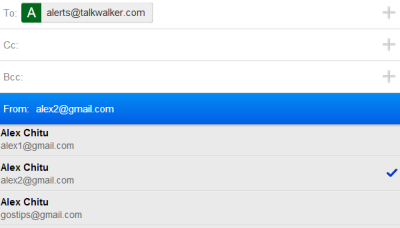
If you've added multiple sending email addresses to your account and you receive messages forwarded from other accounts, Gmail automatically picks the right "from" email address when you send a reply. The trouble is that the mobile Gmail web app has a bug that reverts to the main "from" address after 10-20 seconds or so. You start typing your messages and the "from" address changes. Even if you change it back, it will revert to the main address after a few seconds. This also happens when you compose a new message, not just when you send a reply.
Until Google fixes this issue, it's a good idea to check the "from" field before sending a message from a secondary address. After you change it, you have a few seconds seconds until it reverts to the main address, so send the message quickly. Gmail actually changes the "from" address every time it saves the message.
Google's mobile homepage now promotes the Google Search app for iOS. There's a big banner at the top of the page in both Safari and Chrome for iPhone and iPad.
"Smart App Banners vastly improve users' browsing experience compared to other promotional methods. As banners are implemented in iOS 6, they will provide a consistent look and feel across the web that users will come to recognize. Users will trust that tapping the banner will take them to the App Store and not a third-party advertisement. They will appreciate that banners are presented unobtrusively at the top of a webpage, instead of as a full-screen ad interrupting the web content. And with a large and prominent close button, a banner is easy for users to dismiss," explains Apple.
Google implements a similar feature, but it doesn't work so well. Dismissing the banner doesn't work: when I open google.com in a new tab or refresh the page, the banner shows up again. That's annoying.
How do I know that Google doesn't use Apple's smart app banners? Here's Yelp's site: the banner includes ratings and screenshots from the App Store.
Another clue: Google's banner is also displayed in Chrome and smart app banners are limited to Safari. Google should use the smart app banner for Safari and the custom banner for other browsers. Oh, and you should be able the dismiss the custom banner.
Moto X is no longer a rumor, Motorola's CEO announced it in May. "Moto X will be built in a 500,000-square-foot facility outside of Fort Worth, Texas, that was previously used to build Nokia phones. Seventy percent of manufacturing will take place there, making this the first smartphone built within the United States, Woodside said. However, the processors are from Taiwan and the OLED screens are from Korea." It's surprising to see a CEO that reveals so many details about a new phone before it's launched.
AdAge reports that Motorola will run a full-page ad "in the July 3 editions of The New York Times, USA Today, The Wall Street Journal and Washington Post". The ad announces the "first smartphone designed, engineered and assembled in the USA" and "the first smartphone that you can design yourself".
Motorola has a new logo, is now "a Google company" and has bold ambitions. "We're not just any company," says the ad. Once a mobile phone pioneer, Motorola lost market share and was saved from bankruptcy by Android and Google. Now Motorola tries to bring back innovation and go back to the roots.
"Smartphones are very different than other tech products a consumer owns," says Brian Wallace, Motorola VP. "They're closer to shoes or a watch. You carry it with you everywhere you go. Everyone sees what phone you're carrying and they judge you on it. Yet it's the one thing you carry that's the least customizable." Well, you can always buy a case.
The trouble with assembling phones in the US is that it's expensive and most components are made in Asia. The new Motorola tries to change that. "Marry big science with a good application and you have something. When you take on a really bold vision you yield good results more often," says Regina Dugan, a former DARPA director who now works at Motorola.
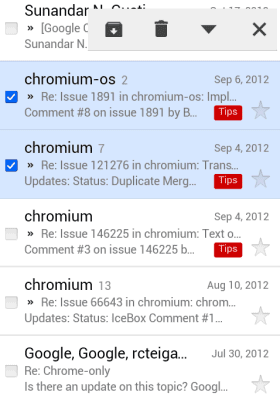
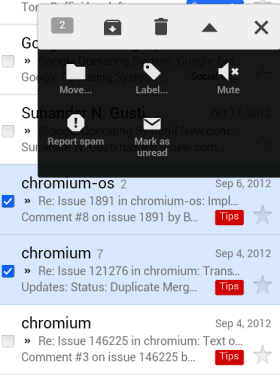
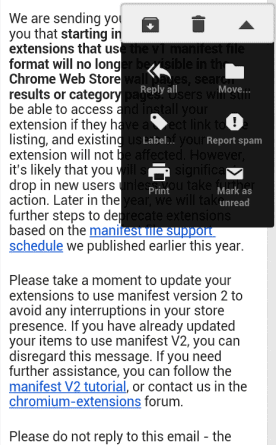
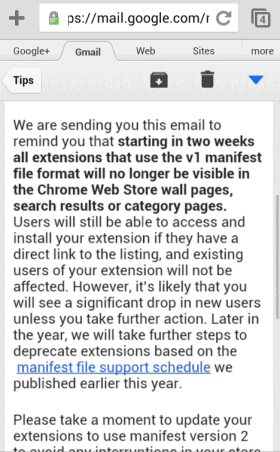
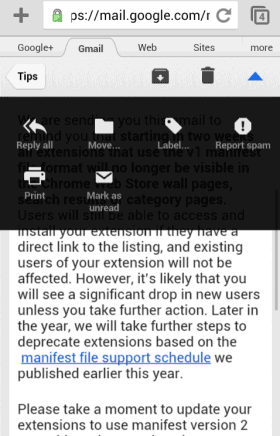
Google tests a new interface for the mobile Gmail web app. The toolbar that includes buttons for archiving messages, marking as unread or adding labels now floats above the message and it no longer has a fixed position.
Here's the new interface that's currently tested (stock Android browser):
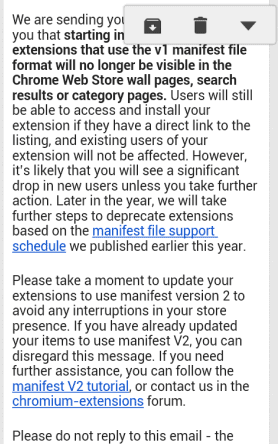
And here's the regular interface (mobile Chrome):
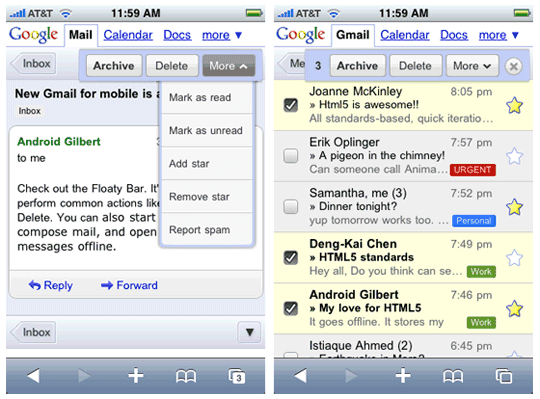
As you can see, the Gmail mobile site goes back to the roots. Back in 2009, Google added a similar bar to the mobile site: "We made extensive use of other browser functions too: for example, the floaty bar that lets you archive, delete or apply more actions is animated via CSS transformations and controlled in part with touch events (when you scroll the screen, it follows you)."
There's an entertaining video that shows 2 Google employees (Mike LeBeau and Amanda Rosenberg) finding answers to various questions using Google Glass.
One of the questions is: "who sings that song where the guy goes 'How Bizarre'?" Google Glass provides the right answer (OMC) and lists a few sites that mention this answer. I asked a similar question using the mobile Google Search app and Google displayed the following message below the answer: "mentioned in results below".
It's nice to see that Google understands verbose questions. Unfortunately, Google no longer mentions the sources that provide the answer. For example, a query like [everest height] used to return an answer, followed by a list of sources.
Here's how it looks today, after the upgrade to the Knowledge Graph:
Google extracts facts from various web pages, so listing some of the sources is appropriate and helps users find reputable sources of information. If the answer is wrong or it's no longer accurate, Google can always point to the sources. As Wikipedia says, "verifiability means that people reading and editing the encyclopedia can check that the information comes from a reliable source".
Google mentions that the "Knowledge Graph isn't just rooted in public sources such as Freebase, Wikipedia and the CIA World Factbook. It's also augmented at a much larger scale because we're focused on comprehensive breadth and depth. It currently contains more than 500 million objects, as well as more than 3.5 billion facts about and relationships between these different objects. And it's tuned based on what people search for, and what we find out on the web."
Back in April, Google launched a cool feature for mobile search that loaded Wikipedia articles faster. Quick View loaded pages in less than 100 milliseconds from Google's servers thanks to a few tricks.
For some reason, the experimental feature is no longer available. The blue button is missing and Wikipedia articles are loaded just like any other search results. Maybe it's a temporary issue.
The Quick View sign-up form is still available. "Mobile quick view is an experimental new project that makes websites appear almost instantly (around 100 milliseconds) after you click on a search result. More and more people are searching on the mobile web, and we will continue to work together with webmasters on making it faster and better. Sign up below to get updates about participating in the mobile quick view field trial," suggests Google.
Chrome for iOS has been updated and now includes the enhanced version of voice search that was available in the Google Search app. The upgraded voice search is more accurate, answers more question, has spoken feedback and it remembers your previous questions, so you can ask "how many calories are in an apple?" and then "what about an orange?".
The microphone icon has been removed from the address bar and it's now placed prominently next to the keyboard. If you start using the keyboard, the voice search button is replaced by some keys that are useful when you enter a web address: ":", ".", "-", "/" and a ".com" button.
Google now shows the words from your question as you speak, so you can see much faster if Google's speech-to-text engine understands what you're saying.
You'll hear the answer and Google will also show a card with more information. Spoken feedback can be disabled from the settings page: go to the voice search section and disable "speak answers back". "The answer can be a fact, weather condition, stock price, flight status, sports score, currency conversion, mathematical calculation, and more. Spoken answers are only supported in English at this time," informs Google.
Voice search is more useful as a Chrome feature than as a feature of the Google Search app, especially if you're already using Chrome. You don't have to open a new app and you can see the results for multiple questions because Chrome has tabs.
For some reason, Chrome for Android still includes the old voice search, but that should change in the near future.
With all this hype about quad-core and dual quad-core phones, I find it amazing that a smartphone from 2009 runs the latest OS version and the latest apps well. I'm sure that a 600 MHz single-core CPU and 256 MB of RAM no longer impress anyone today, not to mention a 480x320 resolution with 163 ppi. Well, a phone with these terrible specs is still relevant: in fact, it's the only phone released in 2009 that's still relevant today. It's the only phone from 2009 that runs Chrome and Google Search with Google Now and enhanced Voice Search without relying on jailbreaking, rooting and custom ROMs.
iPhone 3GS launched with iOS 3.0, which added basic features like cut, copy, and paste or MMS support. Then it was updated to iOS 4.0, which supported third-party apps multitasking. iOS 5.0 brought iCloud and better notifications, while iOS 6.0 for 3GS was a limited release that didn't include many features that were available for iPhone 4S/5. Apple got the foundation right and started to add features later, while Google started with the features and fixed the foundation later.
Back in 2009, Android was buggy and slow, so Google released new software updates quite frequently. Android 1.1, 1.5 and 1.6 added new features and fixed bugs, but didn't focus on the user interface. At that time, not many Android phones were available: G1, HTC Dream, HTC Hero, but Motorola Droid and Verizon's ad campaigns put Android on the map. Motorola Droid had better specs than iPhone 3GS: higher resolution screen, bigger battery, hardware keyboard, microSD support, multitasking, free turn-by-turn navigation. Droid does did look interesting and more feature-packed. Motorola Droid was only officially updated to Froyo (Android 2.2). The latest CyanogenMod release is based on Gingerbread and there are some other ROMs for Ice Cream Sandwich and Jelly Bean.
In January 2010, Google launched Nexus One, a phone with much better specs than Motorola Droid: 1 GHz Qualcomm Scorpion and 512 MB of RAM. It was updated to Froyo and Gingerbread, but the limited internal storage was the most important flaw that made it obsolete. In fact, the only Android phone released in 2010 that was officially updated to Ice Cream Sandwich is Nexus S (December 2010). Ice Cream Sandwich was launched in October 2011.
Meanwhile, Apple's iPhone 3GS is the only iOS device that received 3 major OS updates. Apple usually supports iOS devices for 2 years, so you get at least one major OS update and most often 2 updates. 3GS was still sold (free with contract in the US) until September 2012, when iPhone 5 was announced. 4 years of software updates is unprecedented in the mobile world, with hardware and software that evolves so quickly.
Chrome for iOS doesn't have a lot of things in common with the desktop Chrome or Chrome for Android. It doesn't use the latest WebKit rendering engine and can't switch to Blink, it doesn't use the V8 JavaScript engine, it doesn't have a multi-process architecture. These are iOS limitations and all third-party iOS browsers are built using UIWebView, so they use the same rendering engine and the same JavaScript engine, which is slower than Safari's Nitro (Opera Mini is just an OBML reader, not a browser, because pages are rendered using Opera's servers).
I was surprised to see an ad for Chrome when visiting Google's homepage in Safari for iPad: "Browse fast on your iPad. Install Google Chrome." Chrome for iOS is not fast, it's a lotslowerthan Safari and that's not Google's fault. It's even a little bit slower than other third-party browsers.
Even the Chrome for iOS homepage claims that you can "browse fast and sign in to bring your Chrome experience from your computer, anywhere you go". Sure, Chrome combines the address bar and the search box, preloads web pages and shows the most visited pages, but it's not a faster browser than Safari.
From Tom's Hardware: "In the end, any third-party Web browser on iOS is essentially tantamount to using an older version of Safari with a slightly different user interface and additional features. Due to Apple's App Store mandate that all third-party iOS browsers utilize Safari's stock engines, browser competition on this mobile operating system is practically non-existent. Unless Apple reverses course, allowing other developers to compete using their own unique rending and JavaScript engines."
Amit Singhal announced at Google I/O that this is "the end of search as we know it". The future of search goes beyond search results and it has more to do with answering questions, conversations and anticipating user's intentions.
Google has 3 products with similar goals: Knowledge Graph, Voice Search and Google Now. They go hand in hand to deliver the future of search today.
Voice Search has been available on the desktop if you're using Chrome, but now it's much better: it has been upgraded to the conversational voice search released last year for Android and iOS. Just click the microphone icon from the Google search box, ask questions and you'll get a spoken answer. Soon you'll be to just say "OK Google" to trigger voice search.
Google Search for Android added some new Google Now cards: reminders, last train home (Japan only), real time public transit updates and recommendations for books, games and music albums. Google Now can understand things like "remind me to call Susan tomorrow at 10", "when I go to Rome, remind me to buy a new suit" or "remind me to meet Dan when I get to work". You can create both time-based reminders and location-based reminders.
Voice Search is getting more sophisticated, the Knowledge Graph has more facts and connections between concepts, while Google Now gets smarter and tries to anticipate your searches.
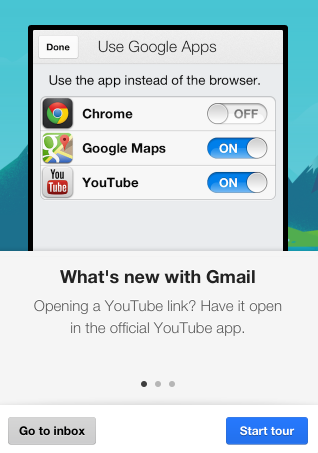
The latest version of the Gmail app for iOS added a feature that opens links using other Google apps: Chrome, Google Maps and YouTube, assuming you've already installed them. It works well for Google Maps links and YouTube links, but not that well for other links: some open using Chrome, but most links open using the internal browser of the Gmail app.
If you don't like this feature, you can disable it by tapping the settings icon next to the account switcher, picking Google Apps and unchecking the apps you don't want to handle Gmail links.
You can't change the default browser in iOS, but some Google apps include an option to use Chrome. For example, the YouTube app opens all the links using Chrome, if you've installed the app, and you can disable this feature from the settings. When you open a page from a Google app like YouTube, Gmail or Google+, Chrome shows a button that sends you to the previous app, just like the Android back button.
If you don't like the tablet interface for Google News, there's a non-obvious way to switch to the desktop interface. Tap the "gear" button from the top-right of the page, select "Settings", uncheck "Use the new Google News (uncheck to revert to the old version)" and then tap "Save changes".
The tablet interface was launched in December 2012 and the goal was to add support for gestures. "You can find new articles, news sources, and even topics of interest with intuitive gestures. Swipe horizontally between sections – from Business to Entertainment, for example – or tap 'Explore in depth' to see multiple articles and other info related to a particular story." Google News for tablets is only available for English editions.
(<offtopic>Google Now Voice Search in a Forbes article? Really? From the article: "Google announced on Monday that the Google Now voice search capability is now available for your iPhone or iPad. The Google Now service is often compared to Apple's Siri – both are considered virtual personal assistants that will work by natural language voice commands." There are at least two mistakes: Google launched Google Now for iOS, not voice search, and Google Now has nothing to do with voice search.</offtopic>)
Google Now for iOS has most of the features from Google's Android app and plenty of customization options that aren't available in the Android app. There aren't many missing cards: research topics, activity summary and events nearby.
I was surprised to see that Google added a lot of settings that let you tweak each card. For example, you can customize the traffic card and decide when it appears and the transportation mode for commutes and other trips.
Since most Google Now cards use location data, it's obvious that Google wants to update your location even when you're not using the app. "Location Reporting helps Google Now show you cards related to traffic alerts, directions, and more. Turning on Location Reporting allows Google to periodically access your location data, even when an app is not in use. If you have Location History enabled, reported locations are stored in your Location History. (...) Since Location Reporting has been optimized to use GPS as infrequently as possible, there should be minimal impact on your battery life." Location Reporting can be disabled from the app's settings section, while Location History can be disabled from the Google Latitude site.
It's interesting to notice that Google Now for iOS is placed less prominently, at the bottom of the screen. You need to swipe up to see the cards. Google Search for iOS doesn't show notifications yet, so you need to constantly open the application to see the new information.
One month ago, Google updated the Gmail app for iOS and added a swipe gesture that lets you move between conversations without having to return to the inbox. At that time, the mobile Gmail site didn't have this feature, but now it's available.
If you like to use Gmail in the mobile browser and you don't want to install a special app for Gmail, you can now swipe left or right to the previous or the next conversation. Unfortunately, this feature is more difficult to use in Chrome because Google's browser has a similar gesture for navigating between tabs. You should avoid swiping from the edge of the screen when you open mobile Gmail.
It's interesting to notice that the "swipe to archive" feature of the mobile Gmail site doesn't work in Chrome for Android, but it works in the stock browser, in Safari and Chrome for iOS.