YouTube 5.0 for Android brings a lot of new features. There's a new card-style layout that's consistent with other Google apps:
The player has fewer buttons:
You can search YouTube, check your subscriptions or the video history, all while watching a video. It's quite clever: the video is minimized when you tap the arrow from the top-left corner or swipe down and it continues to play. You can go back to the video by tapping the small player or swiping up. Unfortunately, this only works in the YouTube app, so don't expect to see the minimized player when you close the app.
There's a new interface in the landscape mode, but only for tablets. Until now, the video played in full-screen when you switched to landscape, but now the YouTube app shows suggested videos, comments and more. You can tap the full-screen button in both the portrait and landscape mode.
Other changes: a new app icon, no more +1 button, HD and CC toggles when you tap the overflow button (a strange decision), playlist search, a new slide-out navigation and more.
Chrome for Android has a "find in page" icon that's easy to miss. When you type some keywords in the omnibox, you can tap the icon highlighted in the screenshot below to find the matches from the currently loaded page. If you tap to the left of the icon, you'll search the web.
When you tap the "find in page" icon, you'll see the same interface that's available when you use the "find in page" feature from the Chrome menu. Use the up/down arrows to see the next/previous match, tap the yellow bars from the scrollbar to go to one of the matches or use the special "find in page" scrollbar.
Even if you close the find bar, you can easily open it again from Chrome's menu. The nice thing is that Chrome remembers your keywords and the current match.
The Android security team has been investigating the root cause of the compromise of a bitcoin transaction that led to the update of multiple Bitcoin applications on August 11.
We have now determined that applications which use the Java Cryptography Architecture (JCA) for key generation, signing, or random number generation may not receive cryptographically strong values on Android devices due to improper initialization of the underlying PRNG. Applications that directly invoke the system-provided OpenSSL PRNG without explicit initialization on Android are also affected. Applications that establish TLS/SSL connections using the HttpClient and java.net classes are not affected as those classes do seed the OpenSSL PRNG with values from /dev/urandom.
Developers who use JCA for key generation, signing or random number generation should update their applications to explicitly initialize the PRNG with entropy from /dev/urandom or /dev/random. A suggested implementation is provided at the end of this blog post. Also, developers should evaluate whether to regenerate cryptographic keys or other random values previously generated using JCA APIs such as SecureRandom, KeyGenerator, KeyPairGenerator, KeyAgreement, and Signature.
In addition to this developer recommendation, Android has developed patches that ensure that Android’s OpenSSL PRNG is initialized correctly. Those patches have been provided to OHA partners.
We would like to thank Soo Hyeon Kim, Daewan Han of ETRI and Dong Hoon Lee of Korea University who notified Google about the improper initialization of OpenSSL PRNG.
/* * This software is provided 'as-is', without any express or implied * warranty. In no event will Google be held liable for any damages * arising from the use of this software. * * Permission is granted to anyone to use this software for any purpose, * including commercial applications, and to alter it and redistribute it * freely, as long as the origin is not misrepresented. */
/** * Fixes for the output of the default PRNG having low entropy. * * The fixes need to be applied via {@link #apply()} before any use of Java * Cryptography Architecture primitives. A good place to invoke them is in the * application's {@code onCreate}. */ public final class PRNGFixes {
private static final int VERSION_CODE_JELLY_BEAN = 16; private static final int VERSION_CODE_JELLY_BEAN_MR2 = 18; private static final byte[] BUILD_FINGERPRINT_AND_DEVICE_SERIAL = getBuildFingerprintAndDeviceSerial();
/** Hidden constructor to prevent instantiation. */ private PRNGFixes() {}
/** * Applies all fixes. * * @throws SecurityException if a fix is needed but could not be applied. */ public static void apply() { applyOpenSSLFix(); installLinuxPRNGSecureRandom(); }
/** * Applies the fix for OpenSSL PRNG having low entropy. Does nothing if the * fix is not needed. * * @throws SecurityException if the fix is needed but could not be applied. */ private static void applyOpenSSLFix() throws SecurityException { if ((Build.VERSION.SDK_INT < VERSION_CODE_JELLY_BEAN) || (Build.VERSION.SDK_INT > VERSION_CODE_JELLY_BEAN_MR2)) { // No need to apply the fix return; }
try { // Mix in the device- and invocation-specific seed. Class.forName("org.apache.harmony.xnet.provider.jsse.NativeCrypto") .getMethod("RAND_seed", byte[].class) .invoke(null, generateSeed());
// Mix output of Linux PRNG into OpenSSL's PRNG int bytesRead = (Integer) Class.forName( "org.apache.harmony.xnet.provider.jsse.NativeCrypto") .getMethod("RAND_load_file", String.class, long.class) .invoke(null, "/dev/urandom", 1024); if (bytesRead != 1024) { throw new IOException( "Unexpected number of bytes read from Linux PRNG: " + bytesRead); } } catch (Exception e) { throw new SecurityException("Failed to seed OpenSSL PRNG", e); } }
/** * Installs a Linux PRNG-backed {@code SecureRandom} implementation as the * default. Does nothing if the implementation is already the default or if * there is not need to install the implementation. * * @throws SecurityException if the fix is needed but could not be applied. */ private static void installLinuxPRNGSecureRandom() throws SecurityException { if (Build.VERSION.SDK_INT > VERSION_CODE_JELLY_BEAN_MR2) { // No need to apply the fix return; }
// Install a Linux PRNG-based SecureRandom implementation as the // default, if not yet installed. Provider[] secureRandomProviders = Security.getProviders("SecureRandom.SHA1PRNG"); if ((secureRandomProviders == null) || (secureRandomProviders.length < 1) || (!LinuxPRNGSecureRandomProvider.class.equals( secureRandomProviders[0].getClass()))) { Security.insertProviderAt(new LinuxPRNGSecureRandomProvider(), 1); }
// Assert that new SecureRandom() and // SecureRandom.getInstance("SHA1PRNG") return a SecureRandom backed // by the Linux PRNG-based SecureRandom implementation. SecureRandom rng1 = new SecureRandom(); if (!LinuxPRNGSecureRandomProvider.class.equals( rng1.getProvider().getClass())) { throw new SecurityException( "new SecureRandom() backed by wrong Provider: " + rng1.getProvider().getClass()); }
SecureRandom rng2; try { rng2 = SecureRandom.getInstance("SHA1PRNG"); } catch (NoSuchAlgorithmException e) { throw new SecurityException("SHA1PRNG not available", e); } if (!LinuxPRNGSecureRandomProvider.class.equals( rng2.getProvider().getClass())) { throw new SecurityException( "SecureRandom.getInstance(\"SHA1PRNG\") backed by wrong" + " Provider: " + rng2.getProvider().getClass()); } }
/** * {@code Provider} of {@code SecureRandom} engines which pass through * all requests to the Linux PRNG. */ private static class LinuxPRNGSecureRandomProvider extends Provider {
public LinuxPRNGSecureRandomProvider() { super("LinuxPRNG", 1.0, "A Linux-specific random number provider that uses" + " /dev/urandom"); // Although /dev/urandom is not a SHA-1 PRNG, some apps // explicitly request a SHA1PRNG SecureRandom and we thus need to // prevent them from getting the default implementation whose output // may have low entropy. put("SecureRandom.SHA1PRNG", LinuxPRNGSecureRandom.class.getName()); put("SecureRandom.SHA1PRNG ImplementedIn", "Software"); } }
/** * {@link SecureRandomSpi} which passes all requests to the Linux PRNG * ({@code /dev/urandom}). */ public static class LinuxPRNGSecureRandom extends SecureRandomSpi {
/* * IMPLEMENTATION NOTE: Requests to generate bytes and to mix in a seed * are passed through to the Linux PRNG (/dev/urandom). Instances of * this class seed themselves by mixing in the current time, PID, UID, * build fingerprint, and hardware serial number (where available) into * Linux PRNG. * * Concurrency: Read requests to the underlying Linux PRNG are * serialized (on sLock) to ensure that multiple threads do not get * duplicated PRNG output. */
private static final File URANDOM_FILE = new File("/dev/urandom");
private static final Object sLock = new Object();
/** * Input stream for reading from Linux PRNG or {@code null} if not yet * opened. * * @GuardedBy("sLock") */ private static DataInputStream sUrandomIn;
/** * Output stream for writing to Linux PRNG or {@code null} if not yet * opened. * * @GuardedBy("sLock") */ private static OutputStream sUrandomOut;
/** * Whether this engine instance has been seeded. This is needed because * each instance needs to seed itself if the client does not explicitly * seed it. */ private boolean mSeeded;
@Override protected void engineNextBytes(byte[] bytes) { if (!mSeeded) { // Mix in the device- and invocation-specific seed. engineSetSeed(generateSeed()); }
try { DataInputStream in; synchronized (sLock) { in = getUrandomInputStream(); } synchronized (in) { in.readFully(bytes); } } catch (IOException e) { throw new SecurityException( "Failed to read from " + URANDOM_FILE, e); } }
private DataInputStream getUrandomInputStream() { synchronized (sLock) { if (sUrandomIn == null) { // NOTE: Consider inserting a BufferedInputStream between // DataInputStream and FileInputStream if you need higher // PRNG output performance and can live with future PRNG // output being pulled into this process prematurely. try { sUrandomIn = new DataInputStream( new FileInputStream(URANDOM_FILE)); } catch (IOException e) { throw new SecurityException("Failed to open " + URANDOM_FILE + " for reading", e); } } return sUrandomIn; } }
private OutputStream getUrandomOutputStream() { synchronized (sLock) { if (sUrandomOut == null) { try { sUrandomOut = new FileOutputStream(URANDOM_FILE); } catch (IOException e) { throw new SecurityException("Failed to open " + URANDOM_FILE + " for writing", e); } } return sUrandomOut; } } }
/** * Generates a device- and invocation-specific seed to be mixed into the * Linux PRNG. */ private static byte[] generateSeed() { try { ByteArrayOutputStream seedBuffer = new ByteArrayOutputStream(); DataOutputStream seedBufferOut = new DataOutputStream(seedBuffer); seedBufferOut.writeLong(System.currentTimeMillis()); seedBufferOut.writeLong(System.nanoTime()); seedBufferOut.writeInt(Process.myPid()); seedBufferOut.writeInt(Process.myUid()); seedBufferOut.write(BUILD_FINGERPRINT_AND_DEVICE_SERIAL); seedBufferOut.close(); return seedBuffer.toByteArray(); } catch (IOException e) { throw new SecurityException("Failed to generate seed", e); } }
/** * Gets the hardware serial number of this device. * * @return serial number or {@code null} if not available. */ private static String getDeviceSerialNumber() { // We're using the Reflection API because Build.SERIAL is only available // since API Level 9 (Gingerbread, Android 2.3). try { return (String) Build.class.getField("SERIAL").get(null); } catch (Exception ignored) { return null; } }
private static byte[] getBuildFingerprintAndDeviceSerial() { StringBuilder result = new StringBuilder(); String fingerprint = Build.FINGERPRINT; if (fingerprint != null) { result.append(fingerprint); } String serial = getDeviceSerialNumber(); if (serial != null) { result.append(serial); } try { return result.toString().getBytes("UTF-8"); } catch (UnsupportedEncodingException e) { throw new RuntimeException("UTF-8 encoding not supported"); } } }
This post varies with device. It can't be displayed because there are so many devices and each one is different.
This paragraph varies with device. It's just a placeholder for a paragraph that should have revealed a lot of useful information. Unfortunately there are so many devices and they have different characteristics, so it's hard to write a paragraph that encompasses their complexity.
This screenshot varies with device. It should show some important information about the Google+ app for Android, but it doesn't because there are multiple Google+ APKs and each one is different.
On a more serious note, there are many Google Play apps that show the uninformative "varies with device". The size of the app varies with device, the current version varies with device and so is the required Android version. That's because Google Play allows developers to upload multiple APKs for the same app:
Multiple APK support is a feature on Google Play that allows you to publish different APKs for your application that are each targeted to different device configurations. Each APK is a complete and independent version of your application, but they share the same application listing on Google Play and must share the same package name and be signed with the same release key. Android applications usually run on most compatible devices with a single APK, by supplying alternative resources for different configurations (for example, different layouts for different screen sizes) and the Android system selects the appropriate resources for the device at runtime. In a few cases, however, a single APK is unable to support all device configurations, because alternative resources make the APK file too big (greater than 50MB) or other technical challenges prevent a single APK from working on all devices.
Even though Google doesn't encourage developers to use this feature, most Google apps use it: Google+, Google Chrome, Gmail, Google Maps, Google Search, Google Play Books, Google Play Movies & TV, Google Translate.
Since Google knows which devices are associated with your Google account, it could show a drop-down that lets you select one of your devices and show the appropriate information. For example, you have a Nexus 7 running Android 4.3 and a Galaxy S3 running Android 4.1. Select one of the devices and replace "varies with device" with something more useful.
App Ops is a hidden application activity in Android 4.3 that lets you manage the permissions used by apps. It was found by Android Police and there's a Google Play app that launches the permission manager (no root required).
I tested App Ops Starter on my Nexus 7 (2012) and it works. There are 4 permission groups: location, personal (contacts, calendar, call logs), messaging (read/write/send SMS) and device (notifications, camera). Each tab shows a list of applications sorted by the time when they last used one of the permissions. App Ops also shows the permissions used by each app.
You can disable permissions for each app you've installed and even for system apps. Sometimes disabling permissions didn't have any effect, other times it worked. For example, I disabled the "read clipboard" permission of the Google+ app and the application no longer suggested the link I copied to the clipboard. I disabled the "location" permission of Google Maps, but the app could still detect my location (I had to disable the Play Services "location" permission to prevent Google Maps from finding my location, but this affects other apps). For now, Android apps aren't optimized for the permission manager and disabling permissions could have unexpected effects: the apps might crash.
Android's permission system encourages developers to add as many permissions as possible, even if they don't currently need them. Maybe they'll use them in the future, so it's better to add them and make sure that the app updates automatically. Android's permissions are all-or-nothing, few bother to read them, even fewer understand them. Google should have done a better job here: encourage developers to use permissions sparingly, allow users to revoke permissions, add opt-in permissions like in iOS. Maybe App Ops will fix some of these issues when it will be officially available, probably in Android 5.0.
- the only Google Play device available in all the 10 countries where you can buy devices from the Play Store
- the only Google Play device available in India
- the best-value Android tablet: you won't find a tablet that costs less than $230 and offers a high-quality screen, powerful SoC, access to the Google Play Store and the latest OS updates
- the first Nexus device that has the same name as the predecessor
- the Android tablet with the highest-density display (the new Nexus 7 - 322 PPI)
- the first 7-inch 1920x1200 tablet (the new Nexus 7).
It looks like Google really wants to close the gap between Android and iOS and add all the missing features. After Google Play Games and Google Cast, Google will add a feature that lets you find your lost phone. There are many third-party apps that offer this feature (some are even included by hardware manufacturers), but nothing beats a built-in feature like "Find my iPhone", especially when it's free and easy to use.
"If you ended up dropping your phone between those couch cushions, Android Device Manager lets you quickly ring your phone at maximum volume so you can find it, even it's been silenced. And in the event that your phone or tablet is out of earshot (say, at that restaurant you left it at last night), you can locate it on a map in real time. (...) If your phone can't be recovered, or has been stolen, you can quickly and securely erase all of the data on your device."
This service will be available later this month for all devices running Android 2.2 or later. It will integrate with your Google Account and you'll be able to install an app that lets you find and manage your devices.
If I were to guess, the service will be added to the next Play Services update. The app is updated automatically by Google Play Store and it requires Android 2.2 or later. Now it also has an icon: you can find it as Google Settings, which groups various settings related to Google+, Google Play Games, location, search, ads, app scanning.
What other standard iOS features would you like to see in Android? I really like "scroll to top", battery percentage in the status bar, changing permissions for each app (location, contacts, photos), "do not disturb" and the full iCloud backup. Some are available in CyanogenMod, TouchWiz, HTC Sense or in third-party apps.
After so much hype, many people were disappointed to see Motorola's first phone influenced by Google. Motorola was acquired by Google two years ago for $12.5 billion, but the real reason why Google bought Motorola wasn't clear. Motorola's patents weren't that useful, Motorola's market share is declining and the company continues to lose money every quarter.
Moto X is supposed to be Motorola's "hero" device, the flagship that shows the new direction of the company. More than 70 Google employees work at Motorola: from Motorola's new CEO, Dennis Woodside, to Steve Horowitz, Motorola's head of software and one of the original members of the Android team. "Nobody's buying products because of minor incremental improvements to Android. So let's rely on what the Android team does and build experiences that will leverage Google services," says Steve Horowitz.
Motorola's phones now use tweaked version of the stock Android. There are some changes, some new apps and some new versions of the stock apps, but they're added on top of the stock Android, so you'll see faster updates. Motorola not only uses Google's Android software, but it tries to create hardware that makes it easy to use Google's software and enhances its features.
Moto X is assembled in the US, in a former Nokia factory. "Motorola placed its entire assembly operation for the X in Fort Worth, Texas. Components come from 16 states and countries around the world, but 2,000 or so workers assemble the phones in Texas and ship them all over America," informs The Verge. Phones are personalized using an online service called Moto Maker, which lets you select the color of the backplate, the front and of the volume buttons, add a signature, pick some matching headphones and make the phone your own. In the future, you'll also be able to pick a different material: wood instead of plastic. At launch, Moto Maker will be limited to AT&T. Motorola will open it to the other US carriers in the near future: Verizon, Sprint, T-Mobile and US Cellular.
"When a car company allows you to choose your interior details or Nike allows you to design your own shoes, it creates what Moto X head product manager Lior Ron calls 'the Ikea effect.' 'Once you finish assembling it, you're emotionally attached to that furniture,' Ron says. 'It's now yours. We see the same attachment here. You've basically gone through the process to build your phone - you are now emotionally attached to that phone.'"
The phone uses two low-power processors that are used by Moto X's most important features. Moto X is always listening, so you can say "ok google now" and then ask something. It's called touchless control and it always you to use your phone without having to touch it. The hotword feature is available in the Google Search app, but Moto X's hardware makes it more useful because you don't have to interact with the device first. There's also a gesture that quickly launches the camera app: just shake your wrist.
Moto X always shows the time and some notification icons. This feature works well because the phone has an AMOLED screen and black pixels are unlit, saving power.
So why are people disappointed? The phone doesn't have great specs: a 4.7-inch 720p AMOLED display, a dual-core Snapdragon S4 Pro 1.7GHz CPU, 2GB of RAM, 2200 mAh battery, 10 MP camera. So last year, you might say. A mid-range phone that costs the same as Samsung's Galaxy S4 or HTC One ($200 on contract for the 16GB version)? Non-removable battery and no SD card?
"We could go and make a higher-resolution screen, but it would just suck battery and nobody would know the difference," says Motorola's Jim Wicks. Most likely, Motorola couldn't source from Samsung a 1080p AMOLED screen and the 720p display was good enough. The dual-core CPU is cheaper, improves battery life and has a similar performance to the quad-core S4 Pro. It uses the same GPU from Nexus 4 and the new Nexus 7 and that's great. A phone is not about raw power, it's about responsiveness, battery life, ease of use. Most of the time, that raw power is left unused. Phones are more about GPU than CPU because responsiveness is more important than performance.
Moto X is not about specs, it's about experience and that's a lesson from the Apple school of thought. Specs are great, but only if they're actually used to build a great experience. A 400+ PPI 1080p screen and a quad-core CPU have their drawbacks and they're probably overkill. Apple's products don't use them, but they work well and are often more responsive than Android devices. The secret is probably software optimization and the integration between hardware and software.
"We've done additional optimizations on top of that such as optimizing the entire Linux user space to move it to an ARM instruction set, cache optimization, Dalvik just-in-time optimization, and we've changed the file system. It's full hardware-software integration to deliver best-in-class performance," says Iqbal Arshad, Motorola's senior vice president of engineering.
It's more about a high-end experience than high-end specs and that's hard to measure. People read the specs and assume that the phone with the fastest processor is the best one, but that's not always true. It's also about tricks that make the device appear more responsive than it really is, tricks that conserve battery, animations that make the experience more pleasant, squeezing every bit of performance from the hardware.
Moto X tries win the specs wars by ignoring it and focusing on something else: the human factor. Patriotism, esthetics, customization, efficiency - all of these try to make the phone more appealing and less intimidating. It's a new Motorola and they're just getting started.
"The Moto X will go on sale in the United States at the end of August or the beginning of September for a suggested retail price of $199.99 to customers who sign a two-year contract at five of the biggest U.S. mobile network operators," informs Reuters.
Here's a nice Easter Egg from the old Google Play interface. You can still find it in Google Cache: scroll to the bottom of the page, click the colorful bar next to the footer and you'll see the Android mascot. Click the robot and it will start dancing.
After a long wait, Google finally released Android 4.3 yesterday. It's a minor update that has more new APIs and improvements for the existing features than exciting new features.
The third and final Jelly Bean installment brings support for virtual surround sound, OpenGL ES 3.0, wireless display, Bluetooth 4.0 (Bluetooth Low-Energy), Bluetooth AVRCP 1.3 (displays song metadata), restricted profiles, WiFi location detection even when WiFi is disabled. There's also a new tab for disabled apps in the settings and the phone app suggests numbers and names when you enable "Dial pad autocomplete".
"Restricted profiles enable parental controls, so certain family members are prevented from accessing mature content. Likewise, retail stores can use tablets to show off product information, and shops can use tablets as point of sale systems," explains Google. Restricted profiles let you limit access to apps and content.
Many Android devices already support Bluetooth 4.0, but now there's native Android support. Bluetooth 4.0 is great for low-power devices. "Android-powered Bluetooth Smart Ready devices running the latest OS will be compatible with virtually any Bluetooth enabled product — from the keyboards or headphones they already own, to the latest generation of power-efficient Bluetooth Smart appcessories (accessories + companion apps) like Fitbit or the Pebble watch," informs Bluetooth.com. More smart accessories will be able to connect to Android devices, Google Glass will have a better battery life when it will be released, smart watches will have to be recharged less often and there's a long list of medical and fitness devices that become smarter: thermometers, heart rate monitors, blood pressure monitors, pedometers, weight scales and more.
OpenGL ES 3.0 is the latest version of the popular 3D graphics API that enhances the rendering pipeline to accelerate more advanced visual effects, has better support for textures and texture compression. The specs were published last year and Qualcomm's latest Adreno GPUs already support it. You can find them in devices like HTC One, Galaxy S4, Nexus 4 and the latest Nexus 7. ARM's Mali T604 also supports it and you can find it in Nexus 10. The native OpenGL ES 3.0 will mean that you'll be able to play the latest games and see all the enhancements.
The first device that ships with Android 4.3 is the new Nexus 7. All the Nexus devices that were updated to Android 4.2 will be updated to Android 4.3: Galaxy Nexus, Nexus 4, the original Nexus 7 and Nexus 10. You'll probably wait for the OTA updates, but Google also provides the firmware here. Galaxy Nexus is the first Nexus device that gets 3 significant Android updates.
The redesigned Google Play Store for the web is finally available. The interface is now consistent with the mobile app, the site now uses AJAX, there's the modern Roboto font, transitions are smoother, thumbnails are bigger and there's less content to see at a glance. You have to scroll more, click more, so you'll have plenty of time to enjoy the new navigation arrows.
There are also bugs. For example, in the Romanian version of the Google Play Store, section titles include some strange exclamation marks that separate the words, instead of spaces. There are a lot of localization issues, including a Kommunikation section (that's a German word).
Google Play now looks like a mobile site resized for the desktop. Instead of taking advantage of the space that's available, the site shows less content and a lot of empty spaces.
Google Hangouts was probably the first Android app update that was gradually rolled out. Then Google officially added support for staged rollouts and any Android developer could use it.
"If you like, you can release your app via a staged rollout, starting with a small percentage of your userbase and then increasing it. You can set and modify the percentage for the staged rollout on the APK section of your Google Play Developer Console, on the Production tab, while keeping an eye on crash reports and user reviews, to make sure users like new functionality in your app. While a staged rollout is in progress, you won't be able to update your production configuration. You must publish the staged rollout to 100% of users first."
You've probably noticed that Google used it for the latest Maps and Chrome updates. Google announces the updates, but you can't install them because they're gradually rolled out. Even if you go to the app's Google Play page, you can't manually update the app. You need to find the APK files and install them from various sites, while hoping that they're legit.
While staged rollouts are useful for developers, they're annoying for the people who want to try the latest features. Google uses a similar approach for web apps like Gmail or Google Docs and for Chrome updates, but there's a trick to manually install the latest Chrome update: go to the about page.
Here's a similar idea for Google Play: limit staged rollouts to automatic updates and allow users who want to get the latest updates to do that by visiting Google Play's app pages and manually installing the updates.
I was trying to find if there's an Android phone that was officially updated for more than 2 years and came up with this list, mostly based on data from Wikipedia articles. Some of the phones have multiple versions and not all of them were updated, while some of the updates were delayed by carriers. I only included the date when the last update was released. Recent phones like Galaxy S4, HTC One, Nexus 4 aren't included.
Most phones from the list got 2 major updates and were supported for less than a year and a half, but these are the flagship devices. For now, it looks like Motorola Droid is the only phone with more than 2 years of official software updates. It's followed by HTC Thunderbolt, with 23 months of updates. Nexus S is close behind, but its updates were timely. Nexus S was updated to Android 4.1 in October 2012, while Thunderbolt was updated to Android 4.0 a few months ago because of Verizon's delays.
Note: Dates are in the dd/mm/yyyy format and dd is always 01. It's a workaround for Google Sheets, which doesn't support the mm/yyyy format.
Thanks, Luís Miguel Viterbo, JD Davison and everyone else who contributed to the spreadsheet.
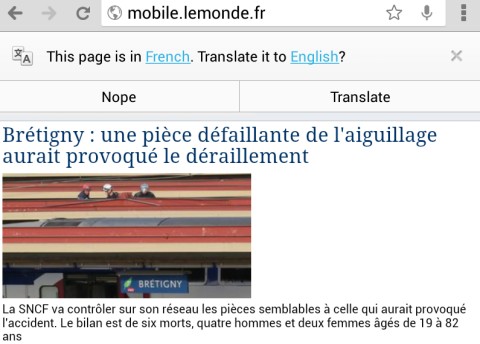
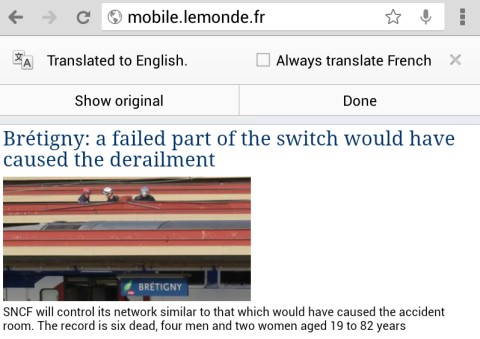
Chrome 28 for Android has a new feature that translates pages automatically. It uses Google Translate and it's similar to the desktop translation feature.
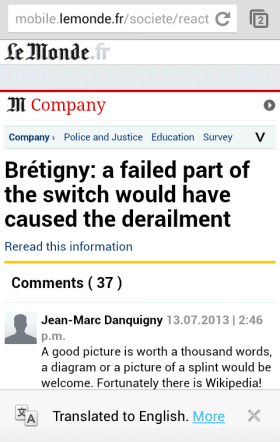
For some reason, Chrome for Android doesn't use the translation settings from the desktop Chrome. They're synced, but the mobile Chrome ignores them. Even if you've asked Chrome in the past to always translate French pages, you'll still see this message: "This page is in Fresch. Translate it to English?" The infobar is placed at the top of the page in the tablet interface and at the bottom of the page in the phone interface.
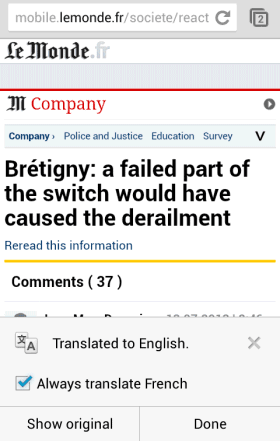
Google's language detection algorithm is not perfect. If Google didn't detect the language properly, you can tap the corresponding link and choose a different language. You can also pick another language for the translation. After the page is translated, you can check "Always translate [this language]".
After selecting "always translate" and visiting a different page written in the same language, the tablet interface shows an infobar and it quickly disappears. The phone interface shows a persistent infobar and you can tap "more" to disable "always translate". For tablets, you need to quickly tap the infobar and you can disable "always translate".
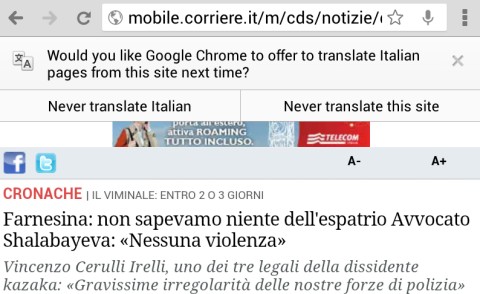
If you answer "no" two times in a row, you'll see an infobar that lets you choose between "never translate [this language]" and "never translate this site".
Translation settings are not synced in Chrome for Android, not even across mobile devices. If you want to disable the Google Translate integration, go to the Settings page, select "Content settings", then "Google Translate" and turn off this feature.
There's a lot of talk about an Android security bug that affects almost all the Android devices. Jeff Forristal from Bluebox Security reported that "the vulnerability involves discrepancies in how Android applications are cryptographically verified & installed, allowing for APK code modification without breaking the cryptographic signature. Details of Android security bug 8219321 were responsibly disclosed through Bluebox Security's close relationship with Google in February 2013."
So the bug could allow someone to create a modified version of an system app and trick other people to install it. The modified version could include malicious code.
Actually, the bug is simple: APK files are ZIP archives and Android allows APK files to include files with the same name. "It's a problem in the way Android handles APKs that have duplicate file names inside," says Pau Oliva Fora, security engineer at security firm ViaForensics. "The entry which is verified for signature is the second one inside the APK, and the entry which ends up being installed is the first one inside the APK - the injected one that can contain the malicious payload and is not checked for signature at all."
The problem is that Android supported duplicate file names in APKs and the patch removed this support. The patch is extremely simple: return an error if the APK file has duplicate file names.
Apparently, Geremy Condra from Google wrote a patch in February. "Google made changes to Google Play in order to detect apps modified in this way and a patch has already been shared with device manufacturers," informs ComputerWorld. CyanogenMod included the bug fix in the latest release, faster than OEMs and even Google, which didn't update Nexus devices to address this issue.
The bug #8219321 is now a test that will show us how fast Google, OEMs and carriers can deploy security patches. For now, CyanogenMod is the place to go to get the latest features and security patches.
The latest version of Google Maps for Android doesn't officially include the feature that allowed you to cache maps and use them offline. You won't find it in the settings or in the app's interface.
Fortunately, there's a way to preload maps, but it's not intuitive: type "OK maps" in the search box and tap the search icon. You'll see this message: "pre-loading maps" or an error message: "the on-screen area map is too large, zoom in first". If you see the error message, zoom in and type "OK maps" again. It's annoying to this again and again.
Another downside is that you can't manage your offline maps. Here's a screenshot from the old Google Maps: you could quickly find cached maps, check how much space they use, rename them or delete them.
Hopefully, Google will add the offline feature to the interface in a future update and make it even better. It would be nice to save bigger maps and to use the offline maps for local search, directions and navigation.
Update: A new version of Google Maps added this option when you tap the search box: "Make this map available offline". It's less cumbersome to use, but still a patchwork.
When Google launched the Maps app for iPhone, many said that it looks better than the Android app. The new interface is now available in Google Maps 7.0 for Android. The app requires Android 4.0.3 and will be rolled out gradually in the coming weeks, but you can download it using these links.
The new Google Maps app has a simplified interface that focuses on the map. It has a lot of things in common with the new Google Maps for desktop, including the missing features. For now, there's no support for My Maps (it will be added later), many layers are missing, Labs features are no longer available. Map caching is now a hidden feature: type "OK maps" in the search box and the app will preload the map you're currently viewing. Google Latitude has been discontinued and replaced by a Google+ feature. In my limited testing, the app was pretty slow and laggy, so Google still has some work to do to optimize the app.
On the plus side, you get a Google Maps interface optimized for tablets, incident reports, dynamic rerouting and some integration with Zagat and Google Offers. "You can now see reports of problems on the road that you can tap to see incident details. While on the road, Google Maps will also alert you if a better route becomes available and reroute you to your destination faster."
There's also a new version of Google Maps for iOS that will be available soon and will add support for iPad.
I'm sure that one of Google's OKRs is to increase the number of pure Android users. This has multiple benefits: users get the latest updates faster, Google promotes its own apps, users get to try Google's original flavor of Android, the latest version of Android gets more market share and developers are encouraged to use the latest APIs.
Here are some strategies used by Google to make pure Android (or almost-pure Android) more popular:
1. Nexus is now a family of affordable devices and Nexus 7 is the most popular Nexus device ever released. Google sells them online in a few countries and provides software updates.
2. Google Editions of the most popular Android devices: HTC One and Samsung Galaxy S4. Manufacturers provide software updates for the devices and include some of their software. Devices are still sold online via Google Play, but only in the US. Maybe other devices will follow.
3. Motorola will only release devices with stock Android. "Consumers love what the Android OS can do for them, and they want to have the most recent releases faster. From a software and UI perspective, our strategy is to embrace Android and to make it the best expression of Android and Google in the market. It will be the unadulterated version of Android, and I feel really good about our embracing Android and being the best Android experience," said Jim Wicks, Motorola's design chief.
4. A lot of stock Android apps are now in Google Play Store and many Google apps are preinstalled on devices from Samsung, HTC and more. You can now install Google's calendar app, the keyboard, Hangouts, Google Search with Voice Search and Google Now, Chrome, Google Maps, Google's music player, Gmail and much more. Some missing apps: the launcher, camera, gallery, clock, calculator, news & weather, contact manager, phone app and the messaging app.
Pure Android is not perfect and some Android flavors from Samsung, HTC and others offer support for more technologies, more features and better built-in apps. What they don't offer is a coherent experience: few developers implement their APIs and you end up with features that only work in a small number of apps, features that compete with each other (Google Voice Search vs S-Voice) and apps you can't remove.
Maybe OEMs should focus on the user experience and add their features and software on top of the pure Android. Improve Google's stock apps, develop a better camera app that takes advantage of your hardware, build a great music player and some beautiful widgets, but only include the apps that are strictly necessary. Featuritis helps create some nice demos, but you end up with software that's hard to maintain and hard to use, while slowing down devices and using more resources.
Moto X is no longer a rumor, Motorola's CEO announced it in May. "Moto X will be built in a 500,000-square-foot facility outside of Fort Worth, Texas, that was previously used to build Nokia phones. Seventy percent of manufacturing will take place there, making this the first smartphone built within the United States, Woodside said. However, the processors are from Taiwan and the OLED screens are from Korea." It's surprising to see a CEO that reveals so many details about a new phone before it's launched.
AdAge reports that Motorola will run a full-page ad "in the July 3 editions of The New York Times, USA Today, The Wall Street Journal and Washington Post". The ad announces the "first smartphone designed, engineered and assembled in the USA" and "the first smartphone that you can design yourself".
Motorola has a new logo, is now "a Google company" and has bold ambitions. "We're not just any company," says the ad. Once a mobile phone pioneer, Motorola lost market share and was saved from bankruptcy by Android and Google. Now Motorola tries to bring back innovation and go back to the roots.
"Smartphones are very different than other tech products a consumer owns," says Brian Wallace, Motorola VP. "They're closer to shoes or a watch. You carry it with you everywhere you go. Everyone sees what phone you're carrying and they judge you on it. Yet it's the one thing you carry that's the least customizable." Well, you can always buy a case.
The trouble with assembling phones in the US is that it's expensive and most components are made in Asia. The new Motorola tries to change that. "Marry big science with a good application and you have something. When you take on a really bold vision you yield good results more often," says Regina Dugan, a former DARPA director who now works at Motorola.
As promised, the Google editions of the Samsung Galaxy S4 and HTC One are available in the US Google Play store (links only work in the US, more screenshots here). Galaxy S4 costs $649, while HTC One is less expensive: $599. They're running stock Android, are unlocked and they're not subsidised by Google or carriers.
"The Google Play edition phones automatically receive updates of the latest Android software. Optimized for the latest apps, more storage for your content and a fast, clean user experience all come standard. With an unlocked smartphone from Google Play, you can find the service plan that suits your needs. Upgrade your handset with no carrier commitment or contract. Unlocked means world travel is easy. Pick up prepaid plans as needed, or get a month-to-month contract with the carrier of your choice," explains Google.
HTC's camera in particular managed to get slightly sharper shots in extremely low-light settings with Sense than the stock version. On both the GS4 and the One I found that video was slightly better on the skinned versions as well, with richer colors. (...)
The stock versions of both the Galaxy S4 and the HTC One well outperformed the skinned versions. In the Verge Battery Test (our standard test that cycles through a series of popular websites and high-res images with brightness set to 65 percent) each phone came in at about six hours. In HTC's case, that's a full hour longer than the Sense version managed to pull off. (...)
Technically, the "stock" Android on these phones doesn't come directly from Google (as with the Nexus line), but instead is built and maintained by Samsung and HTC. Google says that both phones will receive timely updates, but there could be an added wait from Samsung or HTC when the next version comes out.
An interesting tidbit: Google Play has over 975,000 apps and games.