Showing posts with label Security. Show all posts

Wednesday, August 14, 2013

Some SecureRandom Thoughts


The Android security team has been investigating the root cause of the compromise of a bitcoin transaction that led to the update of multiple Bitcoin applications on August 11.


We have now determined that applications which use the Java Cryptography Architecture (JCA) for key generation, signing, or random number generation may not receive cryptographically strong values on Android devices due to improper initialization of the underlying PRNG. Applications that directly invoke the system-provided OpenSSL PRNG without explicit initialization on Android are also affected. Applications that establish TLS/SSL connections using the HttpClient and java.net classes are not affected as those classes do seed the OpenSSL PRNG with values from /dev/urandom.


Developers who use JCA for key generation, signing or random number generation should update their applications to explicitly initialize the PRNG with entropy from /dev/urandom or /dev/random. A suggested implementation is provided at the end of this blog post. Also, developers should evaluate whether to regenerate cryptographic keys or other random values previously generated using JCA APIs such as SecureRandom, KeyGenerator, KeyPairGenerator, KeyAgreement, and Signature.


In addition to this developer recommendation, Android has developed patches that ensure that Android’s OpenSSL PRNG is initialized correctly. Those patches have been provided to OHA partners.


We would like to thank Soo Hyeon Kim, Daewan Han of ETRI and Dong Hoon Lee of Korea University who notified Google about the improper initialization of OpenSSL PRNG.


/*
* This software is provided 'as-is', without any express or implied
* warranty. In no event will Google be held liable for any damages
* arising from the use of this software.
*
* Permission is granted to anyone to use this software for any purpose,
* including commercial applications, and to alter it and redistribute it
* freely, as long as the origin is not misrepresented.
*/

import android.os.Build;
import android.os.Process;

import java.io.ByteArrayOutputStream;
import java.io.DataInputStream;
import java.io.DataOutputStream;
import java.io.File;
import java.io.FileInputStream;
import java.io.FileOutputStream;
import java.io.IOException;
import java.io.OutputStream;
import java.io.UnsupportedEncodingException;
import java.security.NoSuchAlgorithmException;
import java.security.Provider;
import java.security.SecureRandom;
import java.security.SecureRandomSpi;
import java.security.Security;

/**
* Fixes for the output of the default PRNG having low entropy.
*
* The fixes need to be applied via {@link #apply()} before any use of Java
* Cryptography Architecture primitives. A good place to invoke them is in the
* application's {@code onCreate}.
*/
public final class PRNGFixes {

private static final int VERSION_CODE_JELLY_BEAN = 16;
private static final int VERSION_CODE_JELLY_BEAN_MR2 = 18;
private static final byte[] BUILD_FINGERPRINT_AND_DEVICE_SERIAL =
getBuildFingerprintAndDeviceSerial();

/** Hidden constructor to prevent instantiation. */
private PRNGFixes() {}

/**
* Applies all fixes.
*
* @throws SecurityException if a fix is needed but could not be applied.
*/
public static void apply() {
applyOpenSSLFix();
installLinuxPRNGSecureRandom();
}

/**
* Applies the fix for OpenSSL PRNG having low entropy. Does nothing if the
* fix is not needed.
*
* @throws SecurityException if the fix is needed but could not be applied.
*/
private static void applyOpenSSLFix() throws SecurityException {
if ((Build.VERSION.SDK_INT < VERSION_CODE_JELLY_BEAN)
|| (Build.VERSION.SDK_INT > VERSION_CODE_JELLY_BEAN_MR2)) {
// No need to apply the fix
return;
}

try {
// Mix in the device- and invocation-specific seed.
Class.forName("org.apache.harmony.xnet.provider.jsse.NativeCrypto")
.getMethod("RAND_seed", byte[].class)
.invoke(null, generateSeed());

// Mix output of Linux PRNG into OpenSSL's PRNG
int bytesRead = (Integer) Class.forName(
"org.apache.harmony.xnet.provider.jsse.NativeCrypto")
.getMethod("RAND_load_file", String.class, long.class)
.invoke(null, "/dev/urandom", 1024);
if (bytesRead != 1024) {
throw new IOException(
"Unexpected number of bytes read from Linux PRNG: "
+ bytesRead);
}
} catch (Exception e) {
throw new SecurityException("Failed to seed OpenSSL PRNG", e);
}
}

/**
* Installs a Linux PRNG-backed {@code SecureRandom} implementation as the
* default. Does nothing if the implementation is already the default or if
* there is not need to install the implementation.
*
* @throws SecurityException if the fix is needed but could not be applied.
*/
private static void installLinuxPRNGSecureRandom()
throws SecurityException {
if (Build.VERSION.SDK_INT > VERSION_CODE_JELLY_BEAN_MR2) {
// No need to apply the fix
return;
}

// Install a Linux PRNG-based SecureRandom implementation as the
// default, if not yet installed.
Provider[] secureRandomProviders =
Security.getProviders("SecureRandom.SHA1PRNG");
if ((secureRandomProviders == null)
|| (secureRandomProviders.length < 1)
|| (!LinuxPRNGSecureRandomProvider.class.equals(
secureRandomProviders[0].getClass()))) {
Security.insertProviderAt(new LinuxPRNGSecureRandomProvider(), 1);
}

// Assert that new SecureRandom() and
// SecureRandom.getInstance("SHA1PRNG") return a SecureRandom backed
// by the Linux PRNG-based SecureRandom implementation.
SecureRandom rng1 = new SecureRandom();
if (!LinuxPRNGSecureRandomProvider.class.equals(
rng1.getProvider().getClass())) {
throw new SecurityException(
"new SecureRandom() backed by wrong Provider: "
+ rng1.getProvider().getClass());
}

SecureRandom rng2;
try {
rng2 = SecureRandom.getInstance("SHA1PRNG");
} catch (NoSuchAlgorithmException e) {
throw new SecurityException("SHA1PRNG not available", e);
}
if (!LinuxPRNGSecureRandomProvider.class.equals(
rng2.getProvider().getClass())) {
throw new SecurityException(
"SecureRandom.getInstance(\"SHA1PRNG\") backed by wrong"
+ " Provider: " + rng2.getProvider().getClass());
}
}

/**
* {@code Provider} of {@code SecureRandom} engines which pass through
* all requests to the Linux PRNG.
*/
private static class LinuxPRNGSecureRandomProvider extends Provider {

public LinuxPRNGSecureRandomProvider() {
super("LinuxPRNG",
1.0,
"A Linux-specific random number provider that uses"
+ " /dev/urandom");
// Although /dev/urandom is not a SHA-1 PRNG, some apps
// explicitly request a SHA1PRNG SecureRandom and we thus need to
// prevent them from getting the default implementation whose output
// may have low entropy.
put("SecureRandom.SHA1PRNG", LinuxPRNGSecureRandom.class.getName());
put("SecureRandom.SHA1PRNG ImplementedIn", "Software");
}
}

/**
* {@link SecureRandomSpi} which passes all requests to the Linux PRNG
* ({@code /dev/urandom}).
*/
public static class LinuxPRNGSecureRandom extends SecureRandomSpi {

/*
* IMPLEMENTATION NOTE: Requests to generate bytes and to mix in a seed
* are passed through to the Linux PRNG (/dev/urandom). Instances of
* this class seed themselves by mixing in the current time, PID, UID,
* build fingerprint, and hardware serial number (where available) into
* Linux PRNG.
*
* Concurrency: Read requests to the underlying Linux PRNG are
* serialized (on sLock) to ensure that multiple threads do not get
* duplicated PRNG output.
*/

private static final File URANDOM_FILE = new File("/dev/urandom");

private static final Object sLock = new Object();

/**
* Input stream for reading from Linux PRNG or {@code null} if not yet
* opened.
*
* @GuardedBy("sLock")
*/
private static DataInputStream sUrandomIn;

/**
* Output stream for writing to Linux PRNG or {@code null} if not yet
* opened.
*
* @GuardedBy("sLock")
*/
private static OutputStream sUrandomOut;

/**
* Whether this engine instance has been seeded. This is needed because
* each instance needs to seed itself if the client does not explicitly
* seed it.
*/
private boolean mSeeded;

@Override
protected void engineSetSeed(byte[] bytes) {
try {
OutputStream out;
synchronized (sLock) {
out = getUrandomOutputStream();
}
out.write(bytes);
out.flush();
mSeeded = true;
} catch (IOException e) {
throw new SecurityException(
"Failed to mix seed into " + URANDOM_FILE, e);
}
}

@Override
protected void engineNextBytes(byte[] bytes) {
if (!mSeeded) {
// Mix in the device- and invocation-specific seed.
engineSetSeed(generateSeed());
}

try {
DataInputStream in;
synchronized (sLock) {
in = getUrandomInputStream();
}
synchronized (in) {
in.readFully(bytes);
}
} catch (IOException e) {
throw new SecurityException(
"Failed to read from " + URANDOM_FILE, e);
}
}

@Override
protected byte[] engineGenerateSeed(int size) {
byte[] seed = new byte[size];
engineNextBytes(seed);
return seed;
}

private DataInputStream getUrandomInputStream() {
synchronized (sLock) {
if (sUrandomIn == null) {
// NOTE: Consider inserting a BufferedInputStream between
// DataInputStream and FileInputStream if you need higher
// PRNG output performance and can live with future PRNG
// output being pulled into this process prematurely.
try {
sUrandomIn = new DataInputStream(
new FileInputStream(URANDOM_FILE));
} catch (IOException e) {
throw new SecurityException("Failed to open "
+ URANDOM_FILE + " for reading", e);
}
}
return sUrandomIn;
}
}

private OutputStream getUrandomOutputStream() {
synchronized (sLock) {
if (sUrandomOut == null) {
try {
sUrandomOut = new FileOutputStream(URANDOM_FILE);
} catch (IOException e) {
throw new SecurityException("Failed to open "
+ URANDOM_FILE + " for writing", e);
}
}
return sUrandomOut;
}
}
}

/**
* Generates a device- and invocation-specific seed to be mixed into the
* Linux PRNG.
*/
private static byte[] generateSeed() {
try {
ByteArrayOutputStream seedBuffer = new ByteArrayOutputStream();
DataOutputStream seedBufferOut =
new DataOutputStream(seedBuffer);
seedBufferOut.writeLong(System.currentTimeMillis());
seedBufferOut.writeLong(System.nanoTime());
seedBufferOut.writeInt(Process.myPid());
seedBufferOut.writeInt(Process.myUid());
seedBufferOut.write(BUILD_FINGERPRINT_AND_DEVICE_SERIAL);
seedBufferOut.close();
return seedBuffer.toByteArray();
} catch (IOException e) {
throw new SecurityException("Failed to generate seed", e);
}
}

/**
* Gets the hardware serial number of this device.
*
* @return serial number or {@code null} if not available.
*/
private static String getDeviceSerialNumber() {
// We're using the Reflection API because Build.SERIAL is only available
// since API Level 9 (Gingerbread, Android 2.3).
try {
return (String) Build.class.getField("SERIAL").get(null);
} catch (Exception ignored) {
return null;
}
}

private static byte[] getBuildFingerprintAndDeviceSerial() {
StringBuilder result = new StringBuilder();
String fingerprint = Build.FINGERPRINT;
if (fingerprint != null) {
result.append(fingerprint);
}
String serial = getDeviceSerialNumber();
if (serial != null) {
result.append(serial);
}
try {
return result.toString().getBytes("UTF-8");
} catch (UnsupportedEncodingException e) {
throw new RuntimeException("UTF-8 encoding not supported");
}
}
}

Wednesday, July 10, 2013

The Android Bug 8219321

There's a lot of talk about an Android security bug that affects almost all the Android devices. Jeff Forristal from Bluebox Security reported that "the vulnerability involves discrepancies in how Android applications are cryptographically verified & installed, allowing for APK code modification without breaking the cryptographic signature. Details of Android security bug 8219321 were responsibly disclosed through Bluebox Security's close relationship with Google in February 2013."

So the bug could allow someone to create a modified version of an system app and trick other people to install it. The modified version could include malicious code.

Actually, the bug is simple: APK files are ZIP archives and Android allows APK files to include files with the same name. "It's a problem in the way Android handles APKs that have duplicate file names inside," says Pau Oliva Fora, security engineer at security firm ViaForensics. "The entry which is verified for signature is the second one inside the APK, and the entry which ends up being installed is the first one inside the APK - the injected one that can contain the malicious payload and is not checked for signature at all."

The problem is that Android supported duplicate file names in APKs and the patch removed this support. The patch is extremely simple: return an error if the APK file has duplicate file names.


Apparently, Geremy Condra from Google wrote a patch in February. "Google made changes to Google Play in order to detect apps modified in this way and a patch has already been shared with device manufacturers," informs ComputerWorld. CyanogenMod included the bug fix in the latest release, faster than OEMs and even Google, which didn't update Nexus devices to address this issue.

The bug #8219321 is now a test that will show us how fast Google, OEMs and carriers can deploy security patches. For now, CyanogenMod is the place to go to get the latest features and security patches.

Thursday, June 13, 2013

Google Shows Your Recent Sign-ins

There's a new section in the Google Account settings page: recent activity. Google shows a list of recent sign-ins and other security-related actions, with information about the browser, device, IP address and approximate location.


The feature seems similar to Gmail's account activity feature, but it's not. Gmail's feature shows information about about recent activity, whether it's from a browser or an email client, and it's only limited to Gmail. Google's new recent activity feature shows "security-related actions you've taken, like signing in to your Google Account, changing your password, or adding a recovery email address or phone number. This information is for your entire Google Account, so sign-ins from any Google product (such as Blogger, Gmail, or YouTube) will be listed in this section."

There's a subtle difference: "A sign-in is only listed when you've actually typed your username and password to sign in. For example, if you've been signed in to your account for several weeks on your phone, checking your email from time to time, we'll only list the time and location of your initial sign-in." That's not the case for Gmail's account activity feature, which is not limited to the initial sign-ins.

In other related news, Google has a new security dashboard that shows information about your password, recovery options, notifications for unusual activity, 2-step verification and connected applications/sites.


{ Thanks, Florian K. and Herin. }

Wednesday, April 3, 2013

Google Blocks Gmail's Mail Fetcher

Google has always added great security features that protect user accounts: from SSL access to most services, Google Safe Browsing, Gmail's spam and phishing filters to 2-step authentication, phone number verification and Gmail's account activity monitoring.

Sometimes Google's security features are extra paranoid and block Google's own services. I tried to use the mail fetcher feature from a secondary Gmail account and Google mentioned that the authentication failed (it's been enabled before). I entered the right password and Google still couldn't authenticate. Then Google started to show warnings in my main Gmail account, at the top of Google search pages and even sent an email and an SMS message: "Someone recently tried to use an application to sign in to your Google Account. We prevented the sign-in attempt in case this was a hijacker trying to access your account."

Google sent me to this page which says: "We detected activity on your Google Account from a location you don't usually sign in from." The IP address is 209.85.192.147 (mail-pd0-f147.google.com) and it's from United States. Obviously, it's Google's own IP address.


How to fix this issue? Go to this page, click "Yes" and "Yes - Continue". From the Google confirmation message: "As a security precaution, Google may prevent an application from accessing your account if it's the first time we've seen this application sign in to your account, or if it's attempting to sign in from a new location."


Then Google sends you to this page and you need to click "Continue" and "sign in using the application you want to authorize access to your account within the next ten minutes."


Unfortunately for Google, it wasn't even the first time when Gmail's mail fetcher was enabled. Google should find a way to make Gmail's mail fetcher work without having to jump through hoops.

Tuesday, February 19, 2013

Using Cryptography to Store Credentials Safely

random_droid


Following our talk "Security and Privacy in Android Apps" at Google I/O last year, many people had specific questions about how to use cryptography in Android. Many of those revolved around which APIs to use for a specific purpose. Let's look at how to use cryptography to safely store user credentials, such as passwords and auth tokens, on local storage.


An anti-pattern


A common (but incorrect) pattern that we've recently become aware of is to use SecureRandom as a means of generating deterministic key material, which would then be used to encrypt local credential caches. Examples are not hard to find, such as here, here, here, and elsewhere.


In this pattern, rather than storing an encryption key directly as a string inside an APK, the code uses a proxy string to generate the key instead — similar to a passphrase. This essentially obfuscates the key so that it's not readily visible to attackers. However, a skilled attacker would be able to easily see around this strategy. We don't recommend it.


The fact is, Android's existing security model already provides plenty of protection for this kind of data. User credentials should be stored with the MODE_PRIVATE flag set and stored in internal storage, rather than on an SD card, since permissions aren't enforced on external storage. Combined with device encryption, this provides protection from most types of attacks targeting credentials.


However, there's another problem with using SecureRandom in the way described above. Starting with Android 4.2, the default
SecureRandom provider is OpenSSL, and a developer can no longer override SecureRandom’s internal state. Consider the following code:


SecureRandom secureRandom = new SecureRandom();
byte[] b = new byte[] { (byte) 1 };
secureRandom.setSeed(b);
// Prior to Android 4.2, the next line would always return the same number!
System.out.println(secureRandom.nextInt());


The old Bouncy Castle-based implementation allowed overriding the internally generated, /dev/urandom based key for each SecureRandom instance. Developers which attempted to explicitly seed the random number generator would find that their seed replaces, not supplements, the existing seed (contrary to the reference implementation’s documentation). Under OpenSSL, this error-prone behavior is no longer possible.


Unfortunately, applications who relied on the old behavior will find that the output from SecureRandom changes randomly every time their application starts up. (This is actually a very desirable trait for a random number generator!) Attempting to obfuscate encryption keys in this manner will no longer work.


The right way


A more reasonable approach is simply to generate a truly random AES key when an application is first launched:


public static SecretKey generateKey() throws NoSuchAlgorithmException {
// Generate a 256-bit key
final int outputKeyLength = 256;

SecureRandom secureRandom = new SecureRandom();
// Do *not* seed secureRandom! Automatically seeded from system entropy.
KeyGenerator keyGenerator = KeyGenerator.getInstance("AES");
keyGenerator.init(outputKeyLength, secureRandom);
SecretKey key = keyGenerator.generateKey();
return key;
}


Note that the security of this approach relies on safeguarding the generated key, which is is predicated on the security of the internal storage. Leaving the target file unencrypted (but set to MODE_PRIVATE) would provide similar security.


Even more security


If your app needs additional encryption, a recommended approach is to require a passphase or PIN to access your application. This passphrase could be fed into PBKDF2 to generate the encryption key. (PBKDF2 is a commonly used algorithm for deriving key material from a passphrase, using a technique known as "key stretching".) Android provides an implementation of this algorithm inside SecretKeyFactory as PBKDF2WithHmacSHA1:


public static SecretKey generateKey(char[] passphraseOrPin, byte[] salt) throws NoSuchAlgorithmException, InvalidKeySpecException {
// Number of PBKDF2 hardening rounds to use. Larger values increase
// computation time. You should select a value that causes computation
// to take >100ms.
final int iterations = 1000;

// Generate a 256-bit key
final int outputKeyLength = 256;

SecretKeyFactory secretKeyFactory = SecretKeyFactory.getInstance("PBKDF2WithHmacSHA1");
KeySpec keySpec = new PBEKeySpec(passphraseOrPin, salt, iterations, outputKeyLength);
SecretKey secretKey = secretKeyFactory.generateSecret(keySpec);
return secretKey;
}


The salt should be a random string, again generated using SecureRandom and persisted on internal storage alongside any encrypted data. This is important to mitigate the risk of attackers using a rainbow table to precompute password hashes.


Check your apps for proper use of SecureRandom


As mentioned above and in the New Security Features in Jelly Bean, the default implementation of SecureRandom is changed in Android 4.2. Using it to deterministically generate keys is no longer possible.


If you're one of the developers who's been generating keys the wrong way, we recommend upgrading your app today to prevent subtle problems as more users upgrade to devices running Android 4.2 or later.


Thursday, February 14, 2013

Security Enhancements in Jelly Bean

Posted by Fred Chung, Android Developer Relations team


Android 4.2, Jelly Bean, introduced quite a few new features, and under the covers it also added a number of security enhancements to ensure a more secure environment for users and developers.


This post highlights a few of the security enhancements in Android 4.2 that are especially important for developers to be aware of and understand. Regardless whether you are targeting your app to devices running Jelly Bean or to earlier versions of Android, it's a good idea to validate these areas in order to make your app more secure and robust.


Content Provider default access has changed


Content providers are a facility to enable data sharing amongst app and system components. Access to content providers should always be based on the principle of least privilege — that is, only grant the minimal possible access for another component to carry out the necessary tasks. You can control access to your content providers through a combination of the exported attribute in the provider declaration and app-specific permissions for reading/writing data in the provider.


In the example below, the provider ReadOnlyDataContentProvider sets the exported attribute to "true", explicitly declaring that it is readable by any external app that has acquired the READ_DATA permission, and that no other components can write to it.


<provider android:name=”com.example.ReadOnlyDataContentProvider”
android:authorities=”com.example”
android:exported=”true”
android:readPermission=”com.example.permission.READ_DATA” />


Since the exported attribute is an optional field, potential ambiguity arises when the field is not explicitly declared in the manifest, and that is where the behavior has changed in Android 4.2.


Prior to Jelly Bean, the default behavior of the exported field was that, if omitted, the content provider was assumed to be "exported" and accessible from other apps (subject to permissions). For example, the content provider below would be readable and writable by other apps (subject to permissions) when running on Android 4.1 or earlier. This default behavior is undesirable for sensitive data sources.


<provider android:name=”com.example.ReadOnlyDataContentProvider”
android:authorities=”com.example” />


Starting in Android 4.2, the default behavior for the same provider is now “not exported”, which prevents the possibility of inadvertent data sharing when the attribute is not declared. If either the minSdkVersion or targetSdkVersion of your app is set to 17 or higher, the content provider will no longer be accessible by other apps by default.


While this change helps to avoid inadvertent data sharing, it remains the best practice to always explicitly declare the exported attribute, as well as declaring proper permissions, to avoid confusion. In addition, we strongly encourage you to make use of Android Lint, which among other things will flag any exported content providers (implicit or explicit) that aren't protected by any permissions.


New implementation of SecureRandom


Android 4.2 includes a new default implementation of SecureRandom based on OpenSSL. In the older Bouncy Castle-based implementation, given a known seed, SecureRandom could technically (albeit incorrectly) be treated as a source of deterministic data. With the new OpenSSL-based implementation, this is no longer possible.


In general, the switch to the new SecureRandom implementation should be transparent to apps. However, if your app is relying on SecureRandom to generate deterministic data, such as keys for encrypting data, you may need to modify this area of your app. For example, if you have been using SecureRandom to retrieve keys for encrypting/decrypting content, you will need to find another means of doing that.


A recommended approach is to generate a truly random AES key upon first launch and store that key in internal storage. For more information, see the post "Using Cryptography to Store Credentials Safely".


JavascriptInterface methods in WebViews must now be annotated


Javascript hosted in a WebView can directly invoke methods in an app through a JavaScript interface. In Android 4.1 and earlier, you could enable this by passing an object to the addJavascriptInterface() method and ensuring that the object methods intended to be accessible from JavaScript were public.


On the one hand, this was a flexible mechanism; on the other hand, any untrusted content hosted in a WebView could potentially use reflection to figure out the public methods within the JavascriptInterface object and could then make use of them.


Beginning in Android 4.2, you will now have to explicitly annotate public methods with @JavascriptInterface in order to make them accessible from hosted JavaScript. Note that this also only takes effect only if you have set your app's minSdkVersion or targetSdkVersion to 17 or higher.


// Annotation is needed for SDK version 17 or above.
@JavascriptInterface
public void doSomething(String input) {
. . .
}


Secure USB debugging


Android 4.2.2 introduces a new way of protecting your apps and data on compatible devices — secure USB debugging. When enabled on a device, secure debugging ensures that only host computers authorized by the user can access the internals of a USB-connected device using the ADB tool included in the Android SDK.


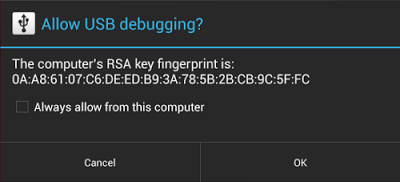
Secure debugging is an extension of the ADB protocol that requires hosts to authenticate before accessing any ADB services or commands. At first launch, ADB generates an RSA key pair to uniquely identifies the host. Then, when you connect a device that requires secure debugging, the system displays an authorization dialog such as the one shown below.


The user can allow USB debugging for the host for a single session or can give automatic access for all future sessions. Once a host is authorized, you can execute ADB commands for the device in the normal way. Until the device is authorized, it remains in "offline" state, as listed in the adb devices command.


For developers, the change to USB debugging should be largely transparent. If you've updated your SDK environment to include ADB version 1.0.31 (available with SDK Platform-tools r16.0.1 and higher), all you need to do is connect and authorize your device(s). If your development device appears in "offline" state, you may need to update ADB. To so so, download the latest Platform Tools release through the SDK Manager.


Secure USB debugging is enabled in the Android 4.2.2 update that is now rolling out to Nexus devices across the world. We expect many more devices to enable secure debugging in the months ahead.


More information about security best practices


For a full list of security best practices for Android apps, make sure to take a look at the Security Tips document.


Wednesday, December 12, 2012

Security Notifications for Google Accounts

A Google help center page mentions a new feature that will be added to the Google Account settings page: security notifications.


"Google notifies you via email and/or text message when your password is changed, and when we detect a suspicious attempt to sign in to your account. If you receive a notification about a password change you didn't make, or an attempt to sign in to your account that wasn't you, these email and text message notifications will provide details on next steps to help you secure your account," informs Google.

This feature should be available under the "security" tab of the Account Settings page, but I don't see it. Maybe it's enabled in your accounts.

In other related news, the Account Settings page has a new interface and shows information about your account activity, a large photo from your profile, Google Drive storage data.


{ Thanks, Herin. }

Thursday, February 2, 2012

Android Market's Malware Scanner

Google doesn't like to manually review user-generated content. It's not efficient and algorithms can do a better job. Imagine how many people would need to be hired to watch all the videos submitted to YouTube (60 hours of videos uploaded every minute).

In some ways, uploading an application to the Android Market is just like uploading a video to YouTube. Sure, you need to pay a fee, but you don't have to wait until a Google employee checks the application. Unfortunately, this also means that the application can include malware, deceive users, crash or spam your contacts. Google usually reviewed the app only after enough users reported that the app is malicious.

Now there's a new service called Bouncer "which provides automated scanning of Android Market for potentially malicious software without disrupting the user experience of Android Market or requiring developers to go through an application approval process. The service performs a set of analyses on new applications, applications already in Android Market, and developer accounts. Here's how it works: once an application is uploaded, the service immediately starts analyzing it for known malware, spyware and trojans. It also looks for behaviors that indicate an application might be misbehaving, and compares it against previously analyzed apps to detect possible red flags. We actually run every application on Google's cloud infrastructure and simulate how it will run on an Android device to look for hidden, malicious behavior".

That seems like a great idea: Google actually tests the apps without having to wait until other users install them and notice there's something wrong. The bad news is that this service was tested last year and was used to find potentially-malicious apps. Despite that, the apps infected by DroidDream were found by a security vendor and not by Google.

"The service has been looking for malicious apps in Market for a while now, and between the first and second halves of 2011, we saw a 40% decrease in the number of potentially-malicious downloads from Android Market. This drop occurred at the same time that companies who market and sell anti-malware and security software have been reporting that malicious applications are on the rise," says Google. Another explanation could be that Google's service is not good enough.

Google also says that Android "makes malware less potent" because it uses sandboxing, it displays the list of permissions and Android Market can remotely remove malware. I don't think that most of the users read the list of permissions. They simply ignore them, click "OK" and install the application. Maybe it would be a better idea to require users to explicitly enable sensitive permissions when they're using the apps.

While security vendors try to scare Android users and push their products, Google should focus on removing spam and malware from the Android Market and make it a safer place. Improving Android's security model and finding ways to install security updates faster are also important.

Tuesday, October 18, 2011

Google Encrypted Search for Logged-in Users

Google announced that in the coming weeks all Google.com users that are logged in will be redirected to Google Secure Search. The secure version of Google Search has been launched last year and now includes all the features from the regular Google interface. The main difference is that the connection is encrypted and Google is the only one who knows the queries you've typed. ISPs, network administrators, those who intercept your connection and the webmasters of the pages from Google's search results won't able to find your searches. "SSL encrypts the communication channel between Google and a searcher's computer. When search traffic is encrypted, it can't easily be decoded by third parties between a searcher's computer and Google's servers," as Google says.

"As search becomes an increasingly customized experience, we recognize the growing importance of protecting the personalized search results we deliver. As a result, we're enhancing our default search experience for signed-in users. Over the next few weeks, many of you will find yourselves redirected to https://www.google.com (note the extra 's') when you're signed in to your Google Account. This change encrypts your search queries and Google's results page. This is especially important when you're using an unsecured Internet connection, such as a WiFi hotspot in an Internet cafe," explains Google.


Right now, https://www.google.com no longer redirects to https://encrypted.google.com and Google no longer informs users that they're using Secure Search. It's important to keep in mind that no other search engine offers this feature and SSL has a performance penalty, which means that search results pages will load slower. This is especially noticeable when you use Google Instant and the results won't show up as fast as before.

After the security incident from December 2009, Google went to great lengths to make its services more secure. Most services that require authentication default to SSL and many no longer offer unencrypted versions. It's interesting to see that Google Search will be treated just like Gmail, Google Docs, Google+ and other services that store user data even if this change won't make too many people happy (users will complain that search results pages load slower, webmasters will complain that their logs will be less useful, AdSense ads from search results will no longer be able to use the Google query and fewer users will click them, companies won't be able to monitor their employees' Google searches). Google already offers some solutions that address these issues: webmasters can use Google Webmaster Tools to find the most popular Google searches that sent users to their sites, while network admins can try the NoSSLSearch option.

It's an important change, but I don't see why signed-in users should be treated differently and why protecting user queries outweighs the drawbacks mentioned earlier. One of the explanations could be that search will no longer be a distinct service and will integrate with Google+, Gmail, Google Docs Drive so much that it will be hard to notice when you've switched to a different app. Larry Page, Google's CEO, has recently said that "our ultimate ambition is to transform the overall Google experience, making it beautifully simple, almost automagical, because we understand what you want and can deliver it instantly. This means baking identity and sharing into all of our products so that we build a real relationship with our users. Sharing on the Web will be like sharing in real life across all your stuff."

Wednesday, July 20, 2011

Google's Yellow Malware Warning Box

Google started to show a yellow warning box at the top of the search results pages if the computer is likely to be infected with malware that changes Web pages, inserts ads and sends users to other pages to download more malware.


"Recently, we found some unusual search traffic while performing routine maintenance on one of our data centers. After collaborating with security engineers at several companies that were sending this modified traffic, we determined that the computers exhibiting this behavior were infected with a particular strain of malicious software (...) that causes infected computers to send traffic to Google through a small number of intermediary servers called proxies," explains Google.

Showing a warning message is not a foolproof idea, since malicious software could easily remove it or use it to install more malware. Google links to a page titled "Your computer appears to be infected", which suggests to install an antivirus software and perform a system scan. The page doesn't suggest to install a different operating system or to buy a Chromebook.

"Some forms of malicious software will alter your computer settings to redirect some or all of your traffic through a proxy controlled by the attacker. When you use Google, the proxy forwards your query to the real Google servers to fetch the search results. If our system detects that a search came through one of these proxies, we display the warning," informs Google.

{ Thanks, Herin. }