Tuesday, August 7, 2012

YouTube App, No Longer Included in Apple's iOS

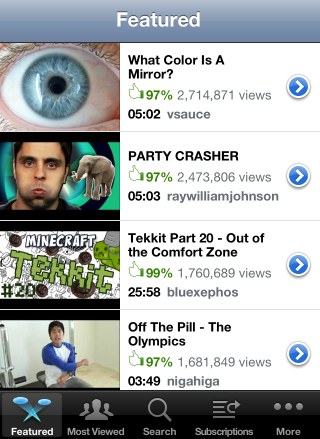
Starting with iOS 6 beta 4, the YouTube app is no longer bundled with Apple's mobile operating system. Apple "said Monday that its license for YouTube has expired, meaning the app will no longer be included in the next version of its mobile operating system, iOS 6. That version is expected to be released to the public this fall and developers are already using it," reports The Wall Street Journal.


Back in 2007, when Apple launched the iPhone, YouTube's video player required Flash, so YouTube videos couldn't be played without a special application. YouTube, which was acquired by Google in 2006, transcoded some of the videos to H.264 and allowed Apple to build a native YouTube application. "To achieve higher video quality and longer battery life on mobile devices, YouTube has begun encoding their videos in the advanced H.264 format, and iPhone will be the first mobile device to use the H.264-encoded videos. Over 10,000 videos will be available on June 29, and YouTube will be adding more each week until their full catalog of videos is available in the H.264 format this fall," mentioned a press release from 2007.

The app is no longer that useful, now that YouTube's mobile site has a great interface and more features than the native app. YouTube's HTML5 video player lets you play videos from Safari or any other browser, so many iPhone users don't even use the YouTube app. Just like the Maps application, the YouTube app was neglected by Apple, which didn't add many useful features. Google has constantly improved the YouTube app for Android and now will also develop a YouTube app for iOS.

Maybe Apple wanted to release a Google-free version of the iOS and the next step could be switching to Bing as the default search engine in Safari, but things are not that bad for Google. After all, YouTube is the most popular video sharing site and Google Maps is the most popular online mapping service. Google can develop its own apps, update them more often and add new features.

Even if YouTube's mobile site can replace the native app, there are two features that couldn't be added by YouTube: uploading videos and supporting the old embedding code. The good news is that both features are available in iOS 6 beta 4 and it's likely that the final version will continue to include them.
Monday, August 6, 2012

Custom Colors in Google Calendar

Last year Google added a new color palette for Google Calendar and many users complained. Some of them thought that the new calendar colors make it difficult to tell events apart, while other people wrote that they're too muted.

Now you can customize calendar colors. Just click the arrow icon next to a calendar in the left sidebar, click "choose custom color" and pick your favorite background color. Select "light text" if the text is hard to read.


"Google Calendar users have had the ability to change the colors of specific events or calendars from a default color palette. Users can now choose a custom color if the default palette does not meet their needs," informs Google. This feature is also available for Google Apps.

Saturday, August 4, 2012

Create Keyboard Shortcuts for Chrome Extensions

Chrome 22 (currently in the Dev channel) has a cool feature that lets you set keyboard shortcuts for extension buttons.

Just open the extensions page (click the wrench icon, then select Tools and Extensions), scroll to the bottom of the page and click "Configure commands". You can enter shortcuts for all the extensions that use browser actions, a fancy name for the buttons displayed next to the Omnibox.


Right now, you can only set shortcuts that simulate clicking the buttons, so they're not useful for all extensions. For example, they're useful for the "Google +1 Button" extension because you can quickly +1 pages, but they're not useful for the LastPass extension because it only displays a long list of options.

There's an experimental Chrome API for extension developers that allows them to add keyboard shortcuts that trigger actions and it's likely that users will be able to customize these shortcuts.

Some shortcuts that work: Ctrl+Letter, Ctrl+Digit, Ctrl+Shift+Letter, Ctrl+Shift+Digit. You can even override standard shortcuts like Ctrl+T, Ctrl+C or Ctrl+P, but you shouldn't do that.

YouTube's Topic-Centric Homepage Experiment

YouTube continues to test new homepage interfaces focused on popular topics. YouTube's topic pages look like channels, but they're automatically generated by YouTube using videos that are related to a topic.

The homepage also shows videos from popular channels. All the links that start with "YouTube -" send you to topic pages for things like "Olympic weightlifting", "Gymnastics", "Driving under the influence", "James Bond Film Series" or "Chick-fil-A". Click "more" to see more videos from the channel or topic page.


The new UI experiment is very similar to the "carousel" interface I've mentioned last month. It only works when you're not logged in and YouTube redirects you to a new page: youtube.com/lohp.

Here's how you can try the latest YouTube experiment. If you use Chrome, Firefox, Opera, Safari or Internet Explorer 8+, open youtube.com in a new tab, sign out, then load:

* Chrome's JavaScript console (Ctrl+Shift+J for Windows/Linux/ChromeOS or Command-Option-J for Mac)
* Firefox's Web Console (Ctrl+Shift+K for Windows/Linux or Command-Option-K for Mac)
* Opera's Dragonfly (Ctrl+Shift+I for Windows/Linux or Command-Option-I for Mac)
* Safari's Web Inspector (how to do that?)
or
* Internet Explorer's Developer Tools (press F12 and select the "console" tab)

and paste the following code, which changes a YouTube cookie:

document.cookie="VISITOR_INFO1_LIVE=9UnXBzJIHDc; path=/; domain=.youtube.com";window.location.reload();

Then press Enter and close the console. Go to youtube.com/lohp to see the experimental interface.

Update: There's also an experiment that redirects users to the "videos" page, which shows popular videos from various categories.


{ via Techno-Net. }

Google's Sidebar-less Search Experiments

Many people noticed the Google search interface experiment I've mentioned back in June. Google tests multiple versions of the interface, but they have one thing in common: the left sidebar is replaced with a horizontal navigation bar.

The new horizontal bar includes Google's specialized search engines and a "search tools" link that displays the advanced search options. The bar is either aligned with the search box or it's aligned with the black bar, depending on the experiment.


It's obvious that Google wants to get rid of the sidebar and make search options more visible, but the new bar might confuse users and the left padding makes the page look unbalanced.

{ Thanks, Ruben, Param, Denis. }

No More Mobile iGoogle

Last month, Google announced that iGoogle will be discontinued next year. Few people noticed a help center article which informed users that "the mobile version will be retired on July 31, 2012".

The mobile iGoogle site no longer works, even if the iGoogle link is still included on the homepage. "As Google announced in early July, iGoogle's mobile version has been retired," mentions a Google employee. Unfortunately, you can't even use the desktop iGoogle site on a mobile device without changing the user agent. You can do that in the mobile Chrome for Android and iOS or in the stock Android 4.0+ browser by visiting www.google.com/ig and selecting "request desktop site" from the menu.


Google suggests users to try mobile apps and add widgets to the home screen if they have an Android device. There are all kinds of apps for weather, news, mail, unit conversion, translation, but the nice thing about iGoogle is that everything is displayed on a single page you can could access from any device. The "Google Now" feature from Android Jelly Bean could replace the mobile iGoogle once Google adds more cards.

Wednesday, August 1, 2012

Use any credit or debit card with Google Wallet

(cross-posted from the Google Commerce Blog)

Since we released the first version of Google Wallet, the app that makes your phone your wallet, we’ve made it available on six phones from Sprint and Virgin Mobile, as well as the new Nexus 7 tablet. We’ve also partnered with more than 25 national retailers, and thanks to MasterCard PayPass, you can pay with your phone at more than 200,000 retail locations across the U.S.

Today we’re releasing a new, cloud-based version of the Google Wallet app that supports all credit and debit cards from Visa, MasterCard, American Express, and Discover. Now, you can use any card when you shop in-store or online with Google Wallet. With the new version, you can also remotely disable your mobile wallet app from your Google Wallet account on the web.


A wallet with all your credit and debit cards
To save a card to Google Wallet, just enter the number into the mobile app, online wallet, or Google Play when making purchases. When you shop in-store, you can use Google Wallet in conjunction with your selected credit or debit card for purchases (more info here). Shortly after making a payment, you’ll see a transaction record on the phone with the merchant name and dollar amount. You can now view a history of all your in-store and online purchases from the online wallet.


To support all credit and debit cards, we changed our technical approach to storing payment cards. The Google Wallet app now stores your payment cards on highly secure Google servers, instead of in the secure storage area on your phone. A wallet ID (virtual card number) is stored in the secure storage area of the phone, and this is used to facilitate transactions at the point of sale. Google instantly charges your selected credit or debit card. This new approach speeds up the integration process for banks so they can add their cards to the Wallet app in just a few weeks. Banks that want to help their customers save cards to Google Wallet, including their custom card art, can apply here — there is no cost.

A wallet you can lock — and remotely disableWe take security very seriously and have always had a dedicated Google Wallet PIN to prevent others from making payments with your Google Wallet. And as always, we encourage Google Wallet customers to set up the phone’s screen lock -- as an extra layer of protection.

Today, we’re adding a Google Wallet security feature that makes it possible for you to remotely disable your mobile wallet on a lost phone. It’s easy. If you lose your phone, just visit the ‘Devices’ section in the online wallet and select the phone with the mobile wallet you wish to disable. When you successfully disable your wallet on a device, Google Wallet will not authorize any transactions attempted with that device*. If the Google Wallet online service can establish a connection to your device, it will remotely reset your mobile wallet, clearing it of card and transaction data. There is no way you can do that with your leather wallet.


The new Google Wallet app is available now on Google Play, and if you have a supported NFC device and are in the United States, we encourage you to give it a try.

Posted by Robin Dua, Head of Product Management, Google Wallet

* For now, Google Prepaid Cards and some Citi MasterCard cards will remain active until Google Wallet can remotely connect and reset your mobile wallet.